Your domain business.Connected from sale to service.
Run domain sales, reseller pricing and wallets, branded connectors, managed DNS and forwarding from WHMCS. Add Premium DNS plans, coordinate portfolio work and give customers a workspace that carries your brand.
Look closer. See what you can do.
Look inside the product, explore its capabilities and see how the work comes together.
See domains, DNS and forwarding at a glance
Review domains, DNS zones and upcoming expiries, then open the relevant domain, reseller and DNS tools.
Explore this capabilityFrom the commercial offer to the customer’s domain.
Build the offer, distribute it through your reseller channel and deliver the services customers use after purchase. Domain Nexus connects the domain’s commercial lifecycle to branded workspaces, DNS tools, forwarding and recurring Premium DNS options.
Domain commerce
Search, quote, register, transfer and renew through the native WHMCS registrar workflow.
Prices and purchase balances
Manage price books, margin rules, promotions, rewards, wallets and financial review.
Reseller distribution
Create reseller and master-reseller offers and publish branded connector packages.
Managed DNS
Choose providers, qualify customers, apply record sets and organize DNS copies and recovery.
Premium DNS
Create recurring plans with expanded limits, alerts, undo, monitoring and report tools.
A branded domain experience
Provide forwarding, branded nameservers, registration certificates and useful portfolio tools.
Take the domain from first search to its next renewal
Give resellers a clear route from finding a domain to managing it after purchase. Search availability, select a term, review the resolved price and collect the contacts or registry details the domain requires. Registration and transfer requests flow through your connected WHMCS registrar, while the workspace follows their progress. Once the domain is active, the available nameserver, contact, lock, privacy and transfer-code tools remain close at hand. Renewal views and portfolio operations help the same customer prepare the next stage, whether they manage a few names or a growing domain business.
- availability
- term and registry requirements
- priced registration/transfer
- queued result
- nameservers/contacts/lock/privacy/EPP
- renewal review.–

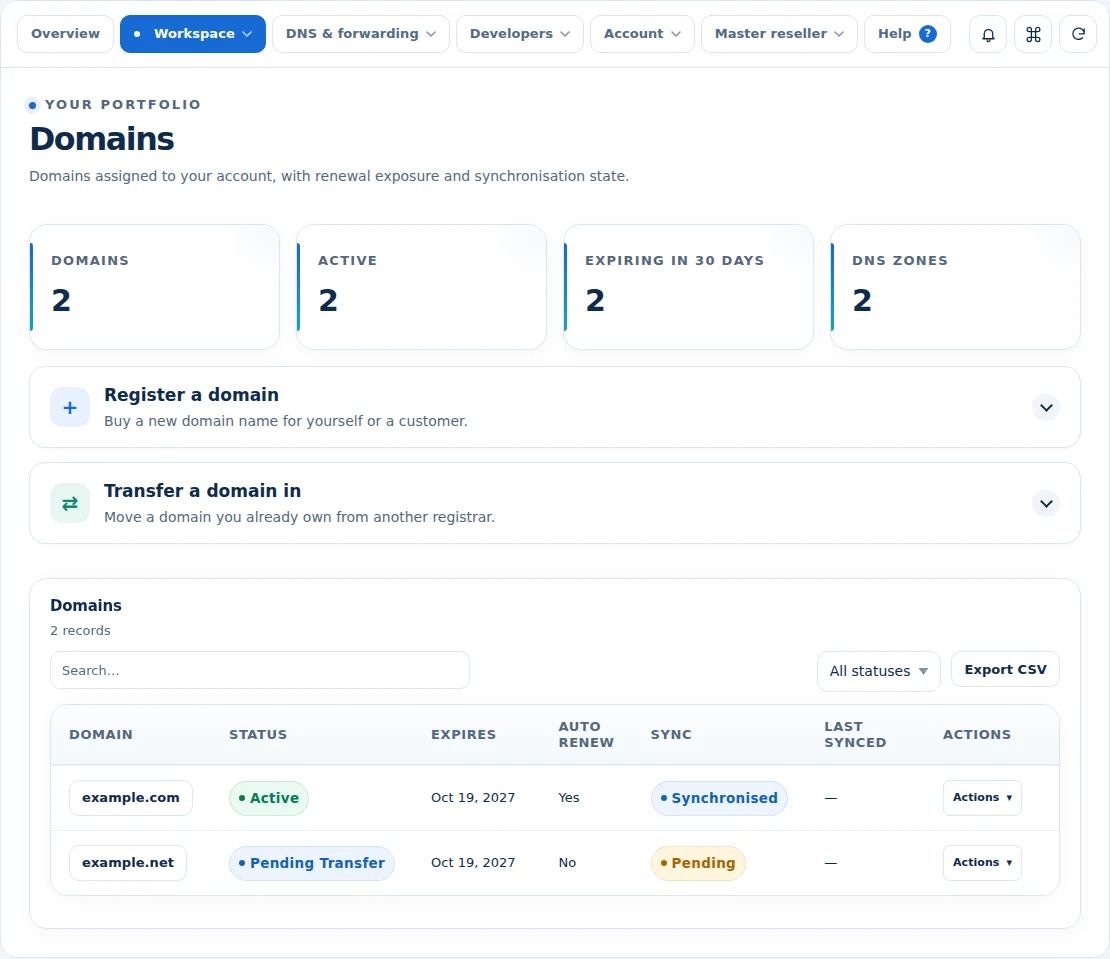 Keep the domain portfolio organised
A domain certificate your customers can keep and verify.
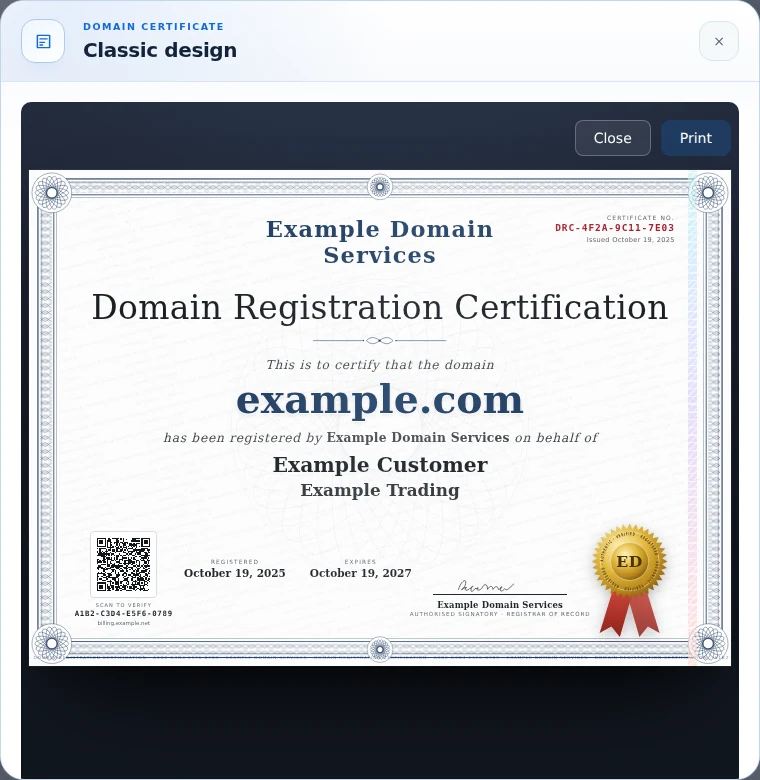
Give customers a polished record of the domain they bought from you. Domain Nexus prepares a printable registration certificate for eligible active domains registered or transferred through your business. The document brings the domain, customer and company names, registration and expiry dates, certificate number and your business identity together. Customers open their own certificate from the domain page, making the finished document part of the service they already use.
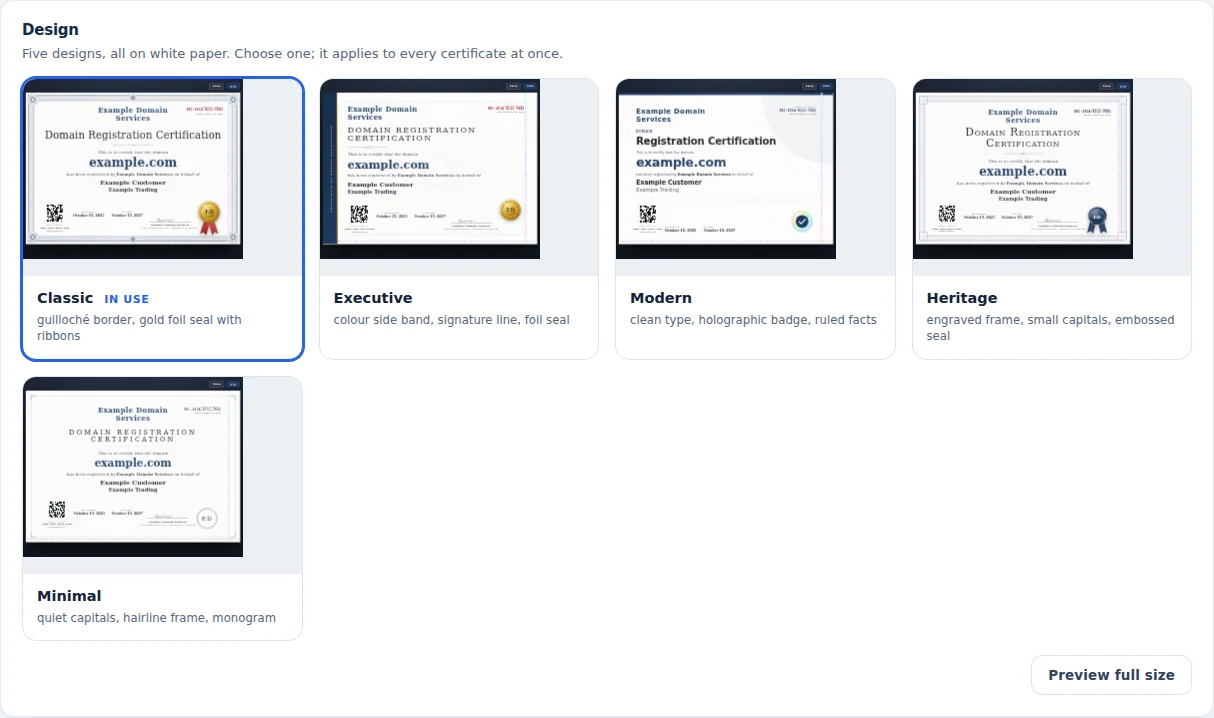
Make the presentation yours. Choose Classic, Executive, Modern, Heritage or Minimal, then set the accent colour and signatory name. Use your WHMCS company name and logo, and upload a signature when you want your own mark on the document. Choose a theme card, designed card, row, button or sidebar placement so customers can find their certificate naturally.
Give every issued document a way to be checked. Its QR code and verification code lead back to your public verification page, where the details are checked against the saved issuance record. Staff can review issued certificates and their verification counts, check a code or uploaded copy, and withdraw or restore a certificate’s verification status. Reseller-issued certificates can carry the partner’s identity and verification destination, with the issuance retained under that reseller.
- Printable certificates for eligible active registrations and transfers
- Domain, registered customer, company and registration dates
- Five designs with company branding and accent colour
- Signatory name and optional uploaded signature
- Customer card, row, button and sidebar placements
- QR code and public verification against the issued record
- Issued-certificate history, checks, withdrawal and restoration
- Branded reseller certificate issuance
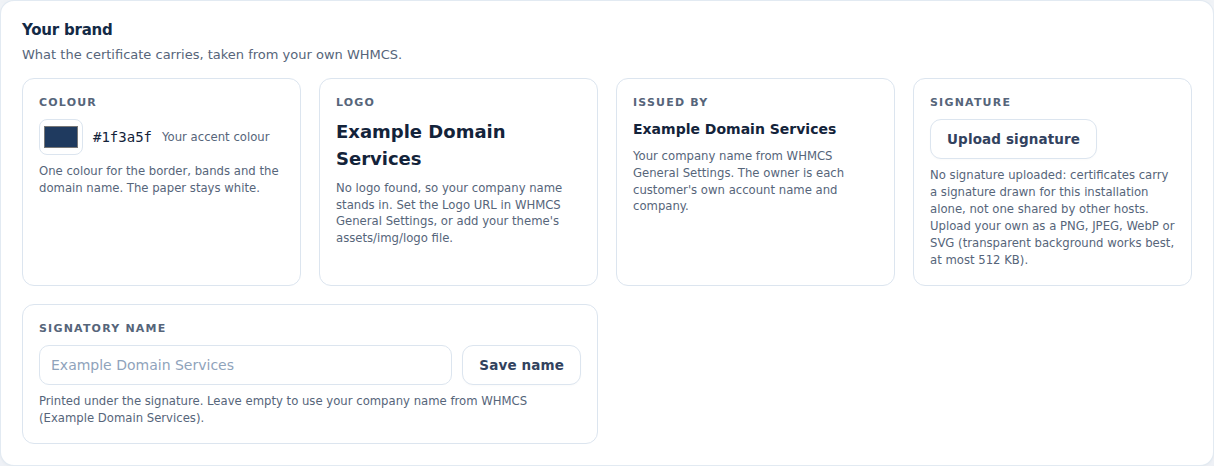 Put your identity on the certificate
Build the offer. Understand the money.
Set prices that fit the way you sell domains. Organize the catalog into published price books, apply group or reseller rules and choose the terms and margins behind each offer. Customers see the calculated price before they commit, including the promotions and rewards that apply. Purchase wallets and WHMCS credit options give repeat buyers a practical way to fund their orders. Statements, order history and refund review keep the financial outcome connected to the original transaction, so your team can explain a charge, investigate a difference and manage the next purchase with context.
- cost/retail rules
- price books
- term/currency resolution
- margin policy
- saved quote/cart preview
- promotions/rewards
Plan work across the portfolio. Follow every domain.
Give a large domain change a clear plan before it starts. Import a list of domains and operations, preview the names included and review the items that need a different approach. Domain Nexus supports portfolio plans of up to 10,000 domain requests, covering registration, transfers, renewals, renewal preferences, locks, privacy, contacts and nameservers. DNS records, record templates, forwarding and reseller moves can also be coordinated through the portfolio workflow.
Turn that plan into a named job your team can follow. Apply the configured approval requirement, start the work and see progress for each item. Pause and resume a job, cancel work that is still pending, or retry an individual item after checking its outcome. Export the results with domain names, operations, provider references and statuses, giving staff a usable record of the work completed across the portfolio.
Prepare for the next renewal window with the same attention to detail. The renewal-risk view brings expiry dates, automatic-renewal preferences, registrar status, current renewal pricing and available purchase funding into one ranked review. Revenue, cost, margin and funding-shortfall summaries help your team understand which renewals need attention and prepare the account before placing the next batch.
- Previewed portfolio plans for up to 10,000 domain requests
- Registration, transfer, renewal and domain-control operations
- DNS, forwarding and reseller-move workflows
- Named jobs with configured approval and per-item progress
- Pause, resume, cancel pending work and retry eligible items
- Exportable outcomes and provider references
- Expiry, renewal-preference and funding review
- Renewal revenue, cost, margin and shortfall summaries
Give your best partners a business of their own
Expand through partners who need more than a single reseller account. A master reseller can create and manage its own downstream resellers, organize their commercial tiers and review the business those accounts generate. Give each partner the appropriate offer and purchase controls, then keep API access, orders and domain activity in the same workspace. The Partner Hub package brings that experience into the master's WHMCS installation. You retain the provider relationship while your partners build a recognizable service for their customers, with the account boundaries and day-to-day controls required to operate it.
- downstream create/update/status
- tiers/TLD prices
- usage/spend controls
- key management
- orders
- commercial adjustments
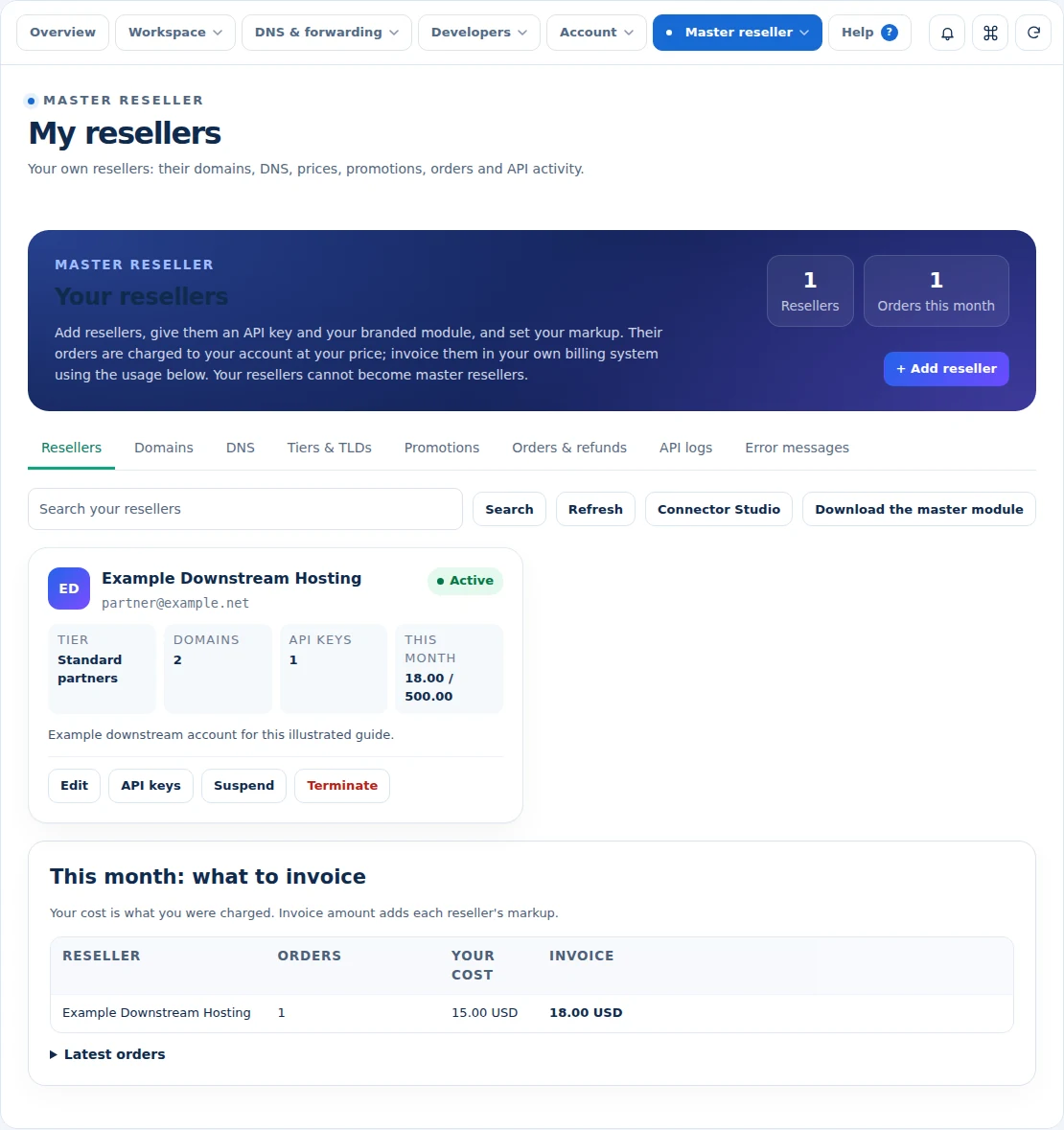
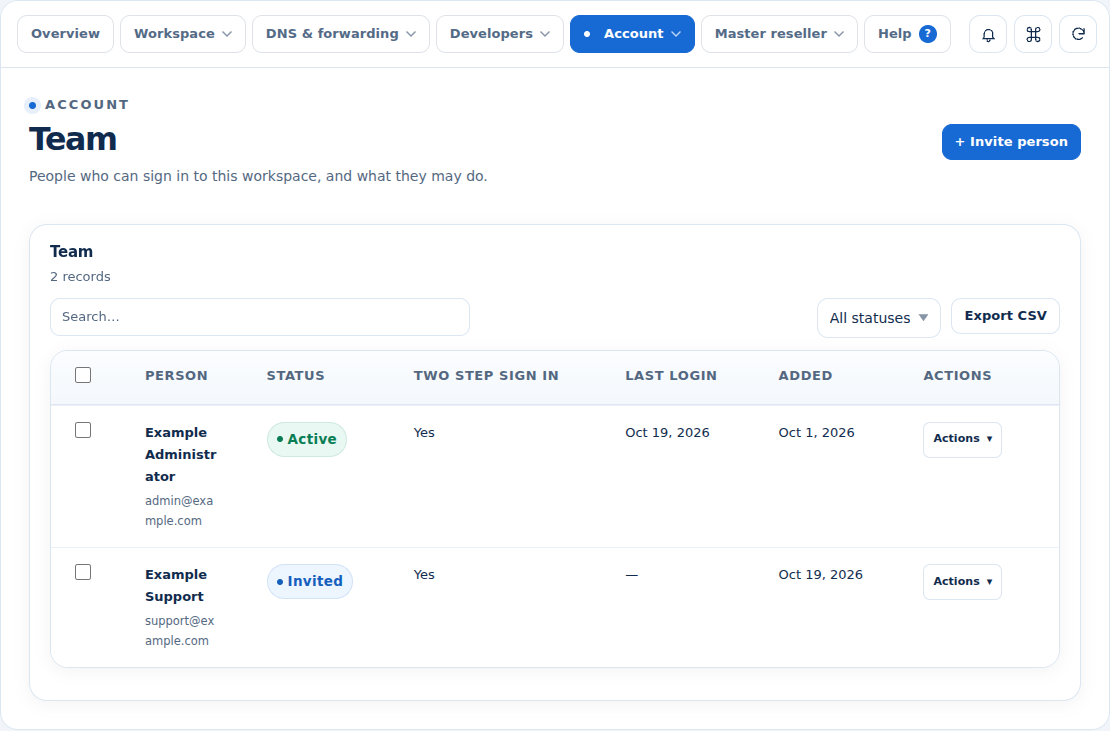 Give the right people account access
Put your brand into the integration
Make the connection part of your product experience. Connector Studio brings the integration's identity, branding, instructions and release availability into one publishing workflow. Prepare a package, review the build and publish it to the audience that should receive it. Resellers download the approved integration and connect with their own account access. For custom applications, the reseller API, client helpers and event deliveries provide a direct route into the same domain operations. Your business can serve partners through a branded package while supporting teams that need to build a connection of their own.
- definition/branding
- build/upload
- publish/withdraw
- authorized downloads
- account API access
- documented operations
Deliver the DNS service behind every domain
Connect the DNS infrastructure that fits your service, then define who can use it and what each package includes. Offer DNS with selected purchases, enroll permitted external domains and give customers a consistent place to manage their records. Reusable record sets make common setups easier, while backups and restoration help with later corrections. Server placement and verified replication keep the configured copies organized. DNSSEC, reverse DNS and secondary-zone tools appear where the selected service supports them, bringing the everyday record work and the deeper operational controls into the same domain experience.
- provider connections
- qualifying purchases/allowances
- external proof
- record CRUD/bulk
- record sets
- backups
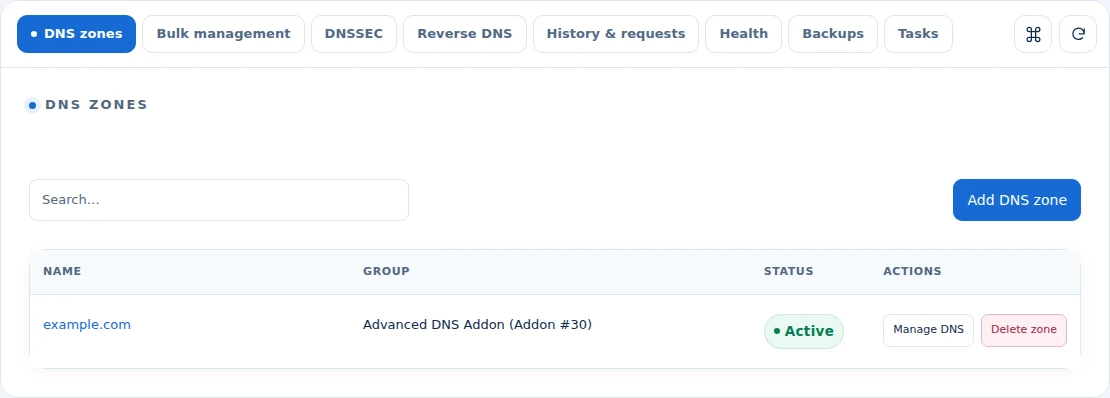
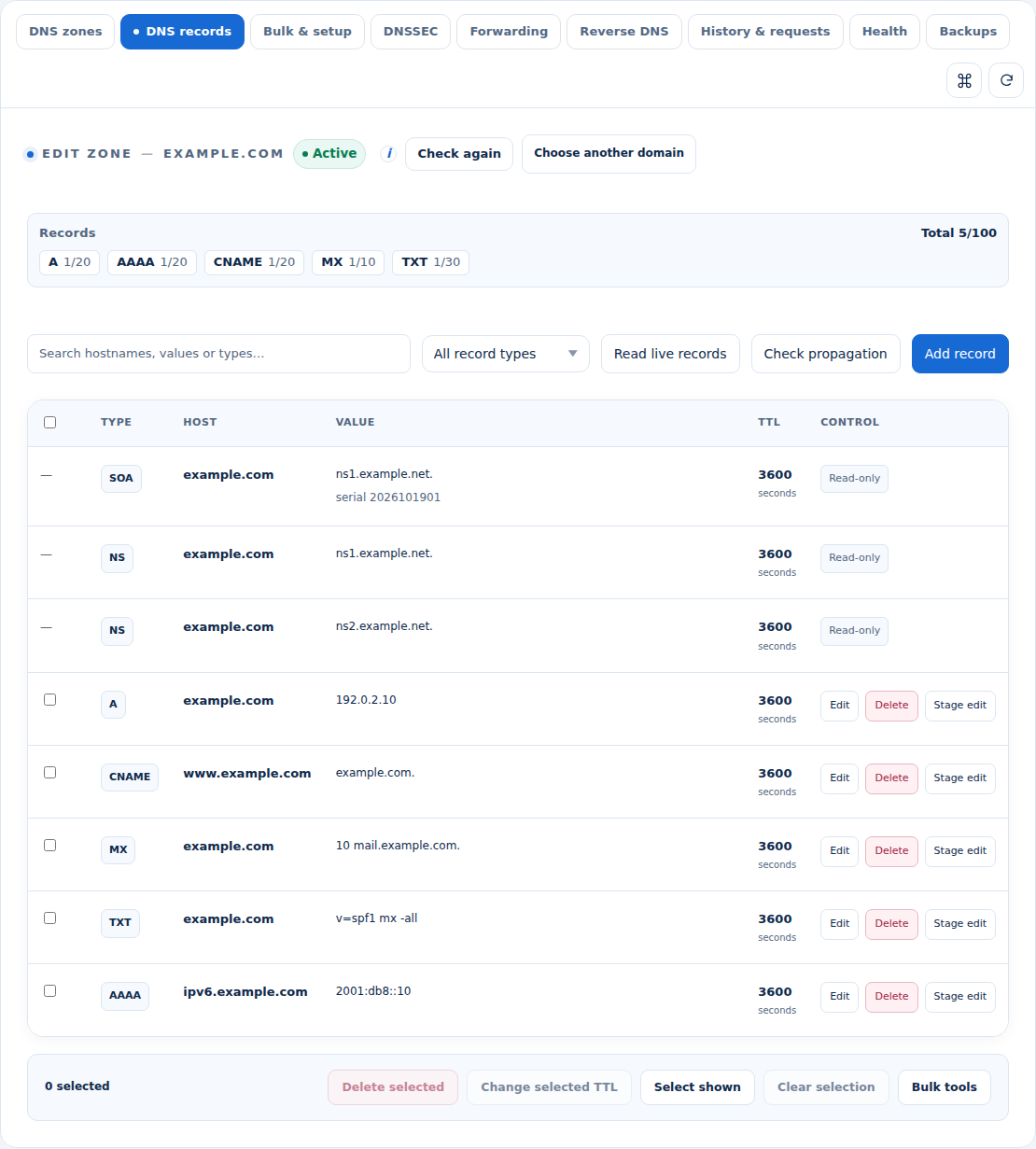 Manage the records behind a domain
Make Premium DNS part of your recurring offer
Turn the DNS workspace into a service customers can upgrade as their needs grow. Create two Premium DNS tiers with your own names, prices and feature presentation, linked to native WHMCS products and billing. Offer increased record limits and backup history, then enable the additional tools that fit each plan. Customers can receive record-change alerts, reverse an eligible applied change, monitor a supported website or TCP endpoint and configure a backup address for DNS failover. Premium DNS Plus can also help them read an uploaded DMARC report, adding useful domain tools to a recurring offer.
- two configurable tiers
- native provisioning/lifecycle/upgrades
- annual multi-currency prices
- limits/backup history
- alerts/undo
- HTTP/HTTPS/TCP monitor and DNS failover
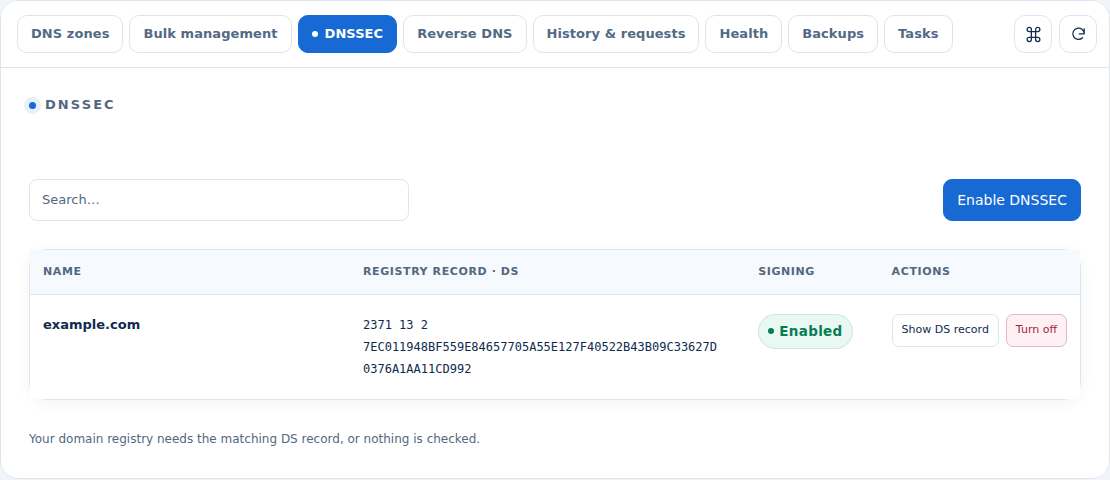
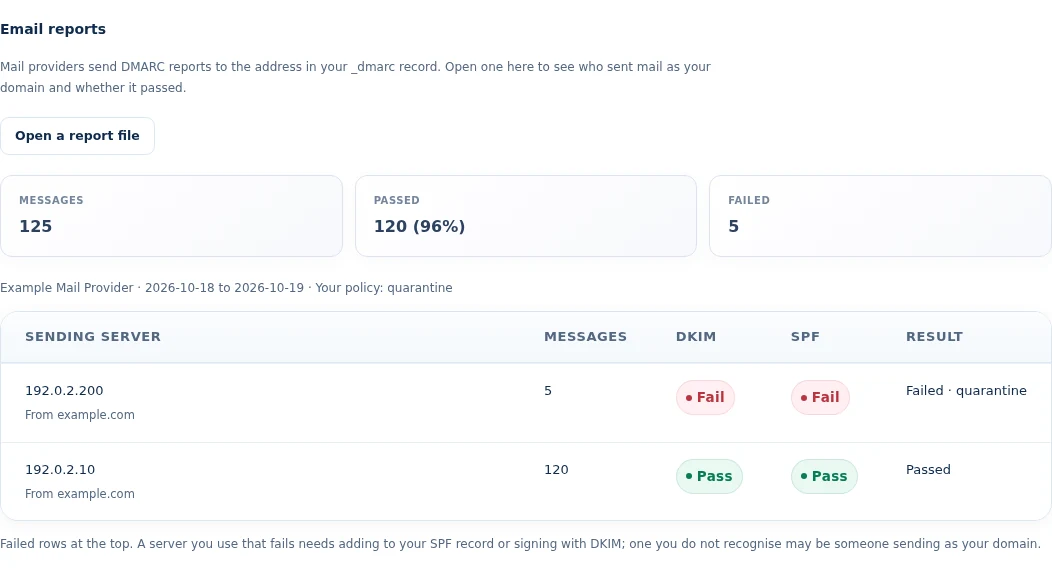 Read domain mail-authentication results
Connect the domain to the destination
Give customers a useful domain even when its website or inbox lives somewhere else. Web forwarding connects the chosen domain address to a destination URL, with the supported redirect and host options available for the selected backend. Email forwarding connects domain-based addresses to verified receiving mailboxes. Your team chooses the forwarding infrastructure, while the workspace keeps the rules, verification and deployment state together. Native panel integrations and the included edge option give you different ways to deliver the service, with the operational views needed to see whether the requested configuration has reached its destination.
- HTTP rule review
- host/status/path/query options
- email verification
- backend-specific alias/catch-all behavior
- cPanel/DirectAdmin/Plesk or edge deployment
- deployment readback.,
A domain experience that carries your name
Keep your identity visible after the customer places the order. Branded nameserver workflows let eligible resellers connect their own base domain, verify control and publish the addresses needed for their service. Registration certificates give customers a print-ready document styled with the provider's brand and the recorded domain details. Choose from the supplied certificate designs and provide a verification link tied to the installation's own issuance record. Together with the branded connector and customer workspace, these details help the domain service feel coherent from purchase through everyday management and the documents a customer keeps.
- nameserver ownership proof and address publication
- delegation/glue checks
- five certificate designs
- branding/signature controls
- issuance/verification/revocation
- print-ready rendering.,
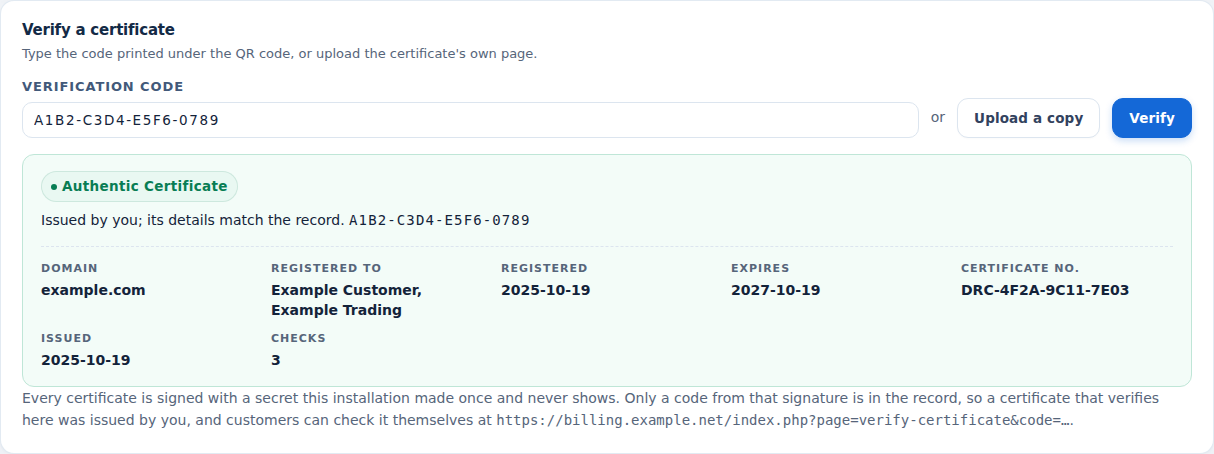 Check a domain certificate
A closer look at what’s included.
Explore the tools inside Domain Nexus, grouped around the work they help you do.
Domain sales and portfolios
- Availability and registry-specific details
- Registration, transfers and renewal handling
- Contacts, nameservers, lock, privacy and EPP
- Portfolio previews, pause/retry and export
- Renewal risk and purchase-funding review
Commerce and accounting
- Published price books and catalog import
- Term, currency, markup and margin rules
- Saved quotes and cart simulation
- Promotions, rewards and purchase wallets
- Statements, settlements and refund review
Resellers and integrations
- Reseller groups and account controls
- Master resellers and downstream offers
- Partner Hub package
- Connector branding, build and publication
- Reseller API, client helpers and webhooks
DNS service toolkit
- Provider connections and server packages
- Purchase eligibility and external-domain proof
- Record sets, bulk changes and zone export
- Replication, moves, backups and restore
- Available DNSSEC, reverse and secondary DNS
Premium DNS
- Two configurable native WHMCS tiers
- Annual multi-currency plan pricing
- Increased limits and backup history
- Applied-change alerts and eligible undo
- Endpoint checks, DNS failover and DMARC reports
Customer experience
- Web and email forwarding
- Native panel and edge forwarding choices
- Branded nameserver workflows
- Registration certificate design and verification
- Customer, reseller and administrator Help Centers
From the first action
to a useful outcome.
Follow the tasks inside Domain Nexus. See which tools come into play and what the finished workflow delivers.
Launch a reseller offer
Connect the commercial setup to the partner’s actual buying and management experience.
Explore the interface- Publish the TLD prices and choose the funding policy
- Create the reseller and assign the intended services
- Prepare the branded connector and publish its availability
- Follow the reseller’s quotes, orders and domain activity
Offer a Premium DNS upgrade
Turn enhanced DNS capabilities into an organized recurring offer.
Explore the interface- Start from the domain’s DNS package
- Configure the premium tiers, prices and extra tools
- Let the customer choose the domain’s offer through WHMCS
- Manage the active plan, monitoring and service lifecycle
Prepare a domain portfolio operation
Make large domain and DNS tasks understandable before and after execution.
Explore the interface- Choose domains and the intended operation
- Review the plan, eligibility and expected price where relevant
- Approve and run the work in batches
- Follow individual outcomes, retry eligible items and export results
Build the offer, then connect the service.
Start with the WHMCS registrar and domain catalog, then configure the pricing, reseller and funding model. Connect the DNS and forwarding infrastructure you want to offer and shape the customer experience with the relevant packages, connectors and branding.
- Configure the registrar offer and published prices
- Set reseller, master and purchase-balance policies
- Connect DNS packages and forwarding services
- Prepare the branded customer and partner experience
Try Domain Nexus free for 7 days.
Explore the module with the workflows that matter to your business. Explore reseller pricing, open a domain workspace and review the Premium DNS and connector workflows. Use the seven-day trial to get familiar with the experience, then continue with an annual licence when you are ready.
- Start your 7-day module trial
- Configure the features you want to explore
- Follow a practical customer or staff workflow
- Continue with the annual licence
See what’s new.
Explore new capabilities, improvements and fixes. Every published release includes its version, date and change details.
Keep up with Domain Nexus.
Open the changelog to read published release notes and explore the product’s development over time.
Domain Nexus Answer Studio
Good questions.
Better answers.
Explore what Domain Nexus can do, how it fits your WHMCS, and the details that matter before you get started.
Tell us what you want to offer your customers. We can help you explore the capabilities and plan your next step.
Contact Nabtech ↗01What does Domain Nexus bring into WHMCS?
Domain Nexus combines domain commerce, reseller and master-reseller management, pricing, quotes and purchase balances with the ongoing domain service. That includes branded connectors, managed DNS, forwarding, Premium DNS, portfolio operations and registration certificates in customer and administrator workspaces.
02Does it use my WHMCS registrar setup?
Yes. Domain availability, purchases and management work through the selected WHMCS registrar and TLD offer. Resellers review the available term, calculated price, contacts and registry details before submitting a request, then follow the domain operation and use the management actions available for that domain.
03Can I create master resellers?
Yes. A permitted master reseller can manage its own downstream accounts, commercial tiers, API access, usage and orders. The master workspace also includes domain and adjustment tools, while the Partner Hub package provides a branded route into the master’s own WHMCS installation.
04What is included in Premium DNS?
You can create two configurable native WHMCS tiers with their own names, prices, limits and feature presentation. Available extras include longer backup history, record-change alerts, eligible undo, HTTP/HTTPS/TCP monitoring with DNS failover and uploaded DMARC aggregate-report analysis. The active domain subscription determines the offered tools.
05How does DNS failover work?
For an eligible single-address A or AAAA record, the customer configures a primary address, a backup address and a supported endpoint check. The monitor follows its failure and recovery policy, changes DNS to the backup when required and returns to the primary after recovery. The workspace shows the current monitor state.
06What can I brand?
Connector Studio supports the integration’s identity, branding and instructions. Eligible resellers can configure branded nameservers, and registration certificates can use the provider’s design and recorded domain details. These controls help carry the business’s identity from partner integration to customer domain management.
07Can I try the module before buying?
Yes. Start the seven-day free trial of Domain Nexus and explore the features through a workflow relevant to your business. The trial page explains the terms and starting steps. The annual licence is available when you decide to continue.
08Where can I see product updates?
The current version is shown on this page, and the Changelog opens the release notes. Each published release explains its new capabilities, improvements and fixes. You can read the notes in the page or open the full release history when you want to follow the product over time.
09Which domains can receive a registration certificate?
Domain Nexus prepares printable certificates for eligible active domains registered or transferred through your business. Customers open their own certificate from the domain page. The document brings together the domain, recorded customer and company details, registration and expiry dates, a certificate number and the issuing business's identity.
10Can I choose the certificate design and add my own signature?
Yes. Choose Classic, Executive, Modern, Heritage or Minimal, then set the accent colour and signatory name. Certificates can use your WHMCS company name and logo, with an optional uploaded signature. Reseller-issued certificates can carry the partner's identity and verification destination, with their issuance retained under that reseller.
11How can a customer check a registration certificate?
The certificate's QR code and verification code lead to the public verification page, where its details are checked against the saved issuance record. Staff can review issued certificates and verification counts, check a code or uploaded copy, and withdraw or restore a certificate's verification status. The check remains connected to the specific document your business issued.
12Can different resellers receive different domain prices?
Yes. Published price books and group or reseller rules let you shape the domain offer for different accounts. Price resolution considers the selected term and currency, with your margin policy and applicable promotions or rewards. Resellers can review the calculated quote or cart before committing to the purchase.
13How can repeat domain buyers fund and review their purchases?
Purchase wallets and WHMCS credit options provide funding choices under the policies you configure. Order history and statements keep charges connected to the domain transaction, while refund review helps staff investigate an adjustment. This gives repeat buyers and your finance team a clearer view of the balance used and the orders it supports.
14Can I prepare one operation for a large domain portfolio?
Yes. Portfolio plans can contain up to 10,000 domain requests for supported operations, including registrations, transfers, renewals, contacts, nameservers, locks and privacy. DNS, forwarding and reseller-move workflows can also be coordinated. Preview the selected names and review their eligibility and expected price where relevant before applying the configured approval and execution process.
15Can staff pause portfolio work and follow the result for each domain?
Yes. A named portfolio job shows progress and outcomes for individual items. Staff can pause and resume the job, cancel work that is still pending, or retry an eligible item after reviewing its result. Exported outcomes include domain names, operations, provider references and statuses, giving the team a usable record of the completed work.
16How does the renewal-risk view help prepare the next renewal batch?
It brings expiry dates, automatic-renewal preferences, registrar status, current renewal prices and available purchase funding into a ranked review. Revenue, cost, margin and funding-shortfall summaries help staff identify renewals that need attention. The team can then prepare the account and review the intended batch with its commercial context in view.
17Can partners use a branded connector or build their own integration?
Yes. Connector Studio lets you prepare a connector package with your identity, instructions and release availability, then publish it to the permitted audience. Resellers download the approved package and connect using their own account access. The reseller API, client helpers and event deliveries also support custom applications using the documented domain operations.
18Can customers use managed DNS for a domain registered elsewhere?
Yes, when the configured DNS offer permits external domains. Eligibility and allowance rules determine who can enroll, and ownership proof connects the requested domain to the customer's service. Once enrolled, the customer uses the applicable record, template, backup and recovery tools provided by the selected DNS package and provider.
19Can customers forward a domain's website and email to existing destinations?
Yes. Web forwarding connects a domain address to a destination URL using the options supported by the chosen backend. Email forwarding uses verified receiving mailboxes. You select the forwarding infrastructure, including the available native panel or edge options, while the workspace keeps the rules, verification and deployment state together for staff and customers to follow.
20How can Premium DNS help a customer understand a DMARC report?
When the relevant Premium DNS Plus feature is included in the domain's active subscription, the customer can upload a DMARC aggregate report for analysis. The report tool helps them read the submitted information within the DNS workspace. Its availability follows the tier and feature settings you choose for the recurring DNS offer.
No questions match that search. Try a different word or explore all topics.
See the difference.Try it in your WHMCS.
Give Domain Nexus a place in your WHMCS. Start a seven-day free trial and explore the capabilities that matter to your business before buying.