Sell the service.Keep its management in view.
Build native WHMCS offers from supported ResellerClub hosting, email, SSL, security and server plans. Give each service a useful customer workspace, with the pricing, orders, product-specific controls and staff operations behind it.
Look closer. See what you can do.
Look inside the product, explore its capabilities and see how the work comes together.
Manage the purchased email service
Review the service’s mailboxes and open controls for profiles, passwords and mailbox access.
Explore this capabilityGive every product family its own useful experience.
Build the range deliberately and support the work that follows each order. ResellerClub Manager connects native commerce to hosting access, email administration, certificate setup and the customer’s service records, with tools for staff to manage the ongoing relationship.
Build the catalogue
Select exact account plans and shape native products, configurations and compatible addons.
Price the relationship
Review initial and renewal costs with margin, currency and per-offer controls.
Deliver the order
Connect the paid invoice, customer and selected supplier plan to provisioning and renewal.
Manage the service
Offer a family-aware customer workspace with tools, billing, records and help.
Grow the account
Provide supported hosting, email, Titan and server growth plus independent addons.
Keep staff informed
Review service monitoring, operation history, supplier statements and financial context.
Turn selected plans into a complete catalogue
Build the range your business wants to sell from the plans available to your ResellerClub account. Review the family, product identity and terms, then shape the native WHMCS groups, products, options and compatible addons around your offer. Preview the result before publication, with the names and commercial details your customers will see. Shared hosting, reseller hosting, email, certificates and other supported families can sit in a consistent store while retaining their own service requirements. As the catalogue develops, keep selected plans, their native records and the source behind them connected.
- Account-aware catalogue discovery and exact plan selection
- Native products/groups with editable customer presentation
- Compatible plan variants and independent addons
- Hidden staging, per-plan outcomes and reviewed publication
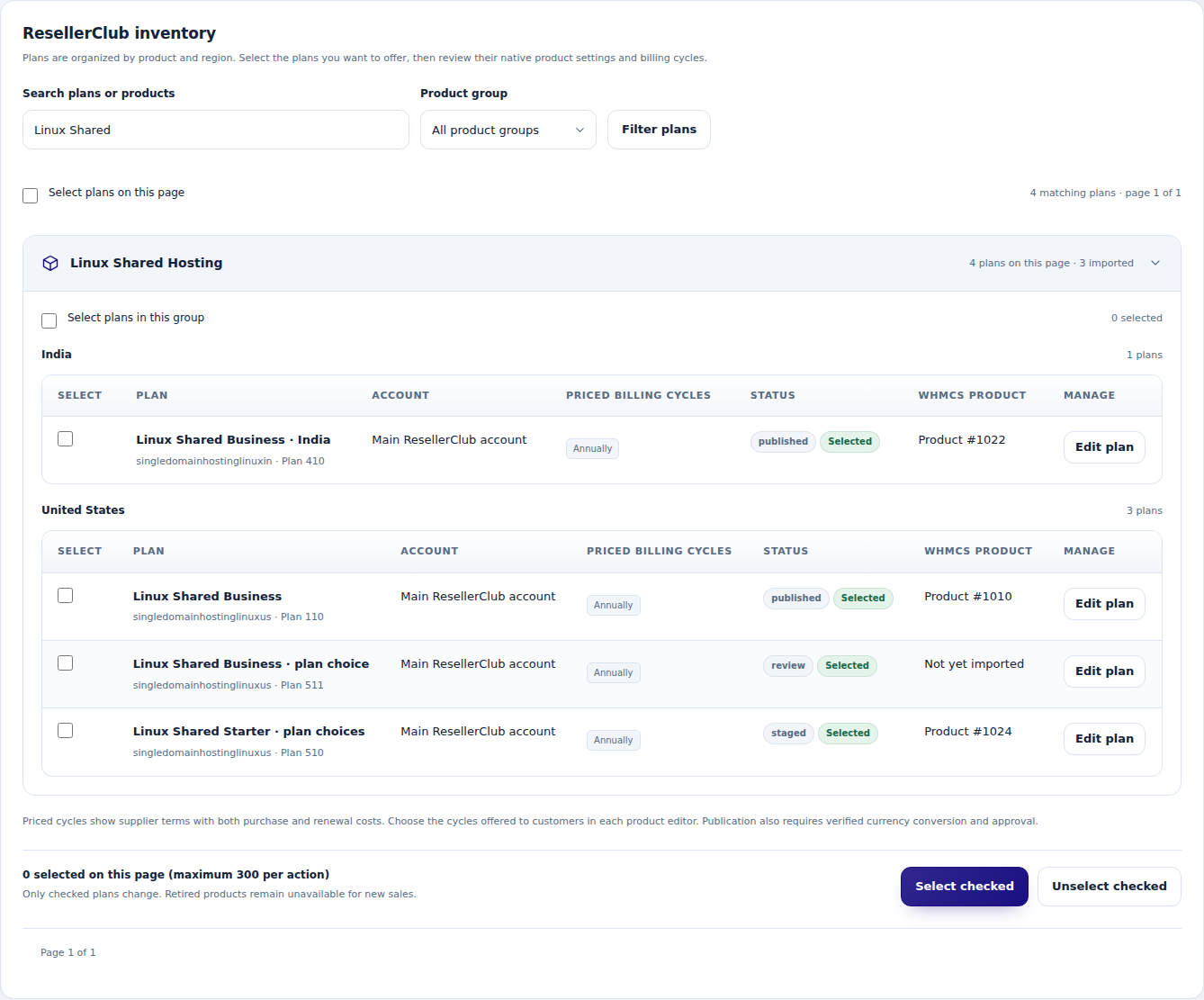
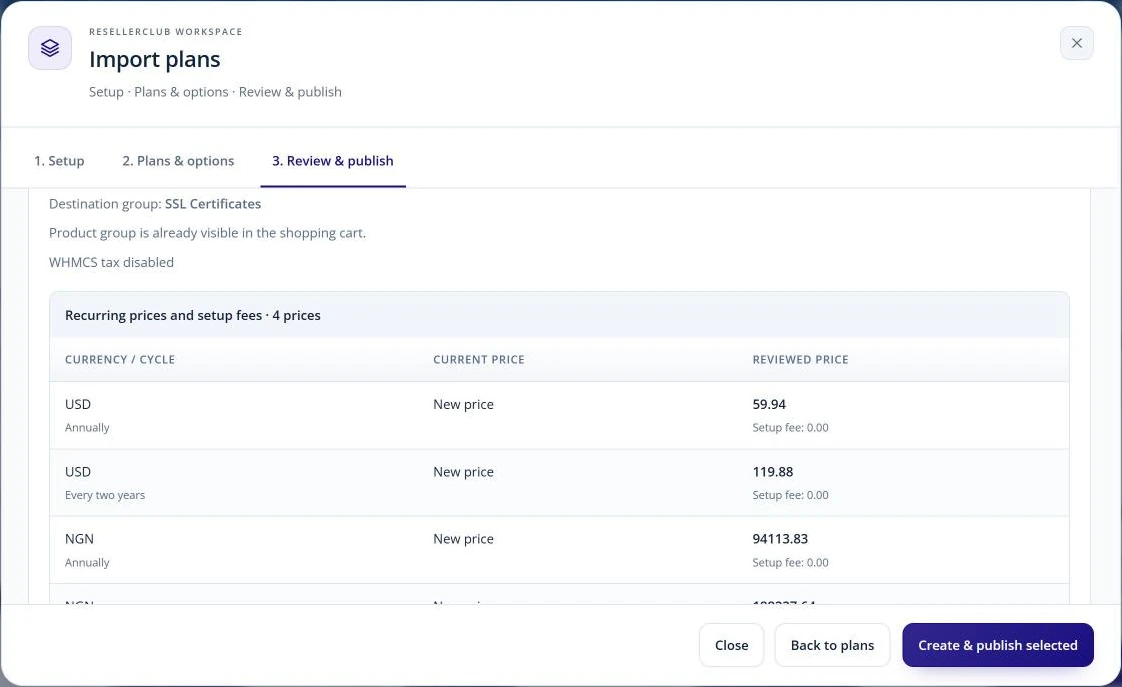 Review the products prepared for sale
Price for the first sale and the next renewal
Set retail prices with the ongoing service in view. Review the supplier's initial and renewal costs, choose margin or markup, and apply the currency and rounding rules that fit your store. Shared policies provide a starting point, while family and product overrides let you handle different economics deliberately. Cost and exchange-rate changes can be reviewed before they affect an offer. Catalogue updates keep their connection to the native WHMCS price records, and existing customer contracts remain under their own control as you maintain the range for future orders.
- Initial and renewal costs in the pricing review
- Margin/markup, manual prices, buffers and profit safeguards
- Reviewed native/manual FX and optional scheduled reference FX
- Cost-age, cost-movement and price-ownership controls

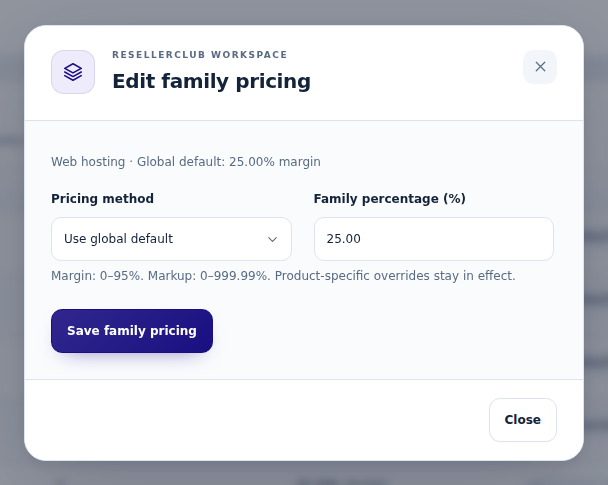 Manage pricing across a product family
Give every service a useful customer destination
The customer's account should remain useful after the order is paid. Give each connected service an organised workspace for its status, management tools, billing, records and help. The experience adapts to the product: eligible hosting services offer their panel entry, email exposes its relevant tools, and certificates show the steps toward issuance. Customers can review their plan, open permitted invoice links and find the service information needed for support. The same structure keeps a growing account understandable while each family presents the controls and guidance appropriate to the service purchased.
- Compact Product Details entry and dedicated service pages
- Overview, Manage service, Billing & plan, Service records and Help
- Supported hosting/WHM handoffs with active-service checks
- Family-aware content and contact permission controls
Make email a service customers can manage
Give supported Business and Enterprise Email customers the tools for everyday account administration. Create mailboxes, maintain the available profile and recovery details, change passwords and control access from the service workspace. Add forwarding or a forward-only address when mail needs to reach another destination, and verify control of an additional domain before attaching its alias. DNS guidance helps explain the records the service expects. Titan follows its own connected experience, with a temporary console entry and mailbox-capacity information, so customers reach the management route appropriate to their email product.
- Direct mailbox administration for supported US email services/addons
- Forwarding, forward-only addresses and verified domain aliases
- Provider-returned email DNS records and action history
- Titan console entry, setup information and eligible capacity growth
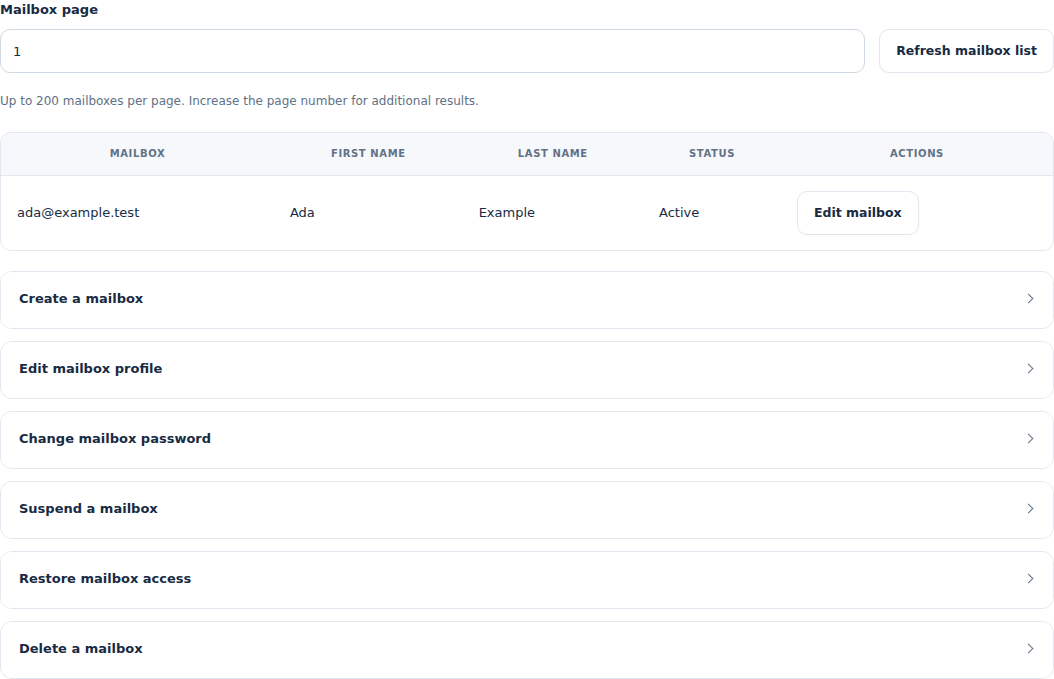
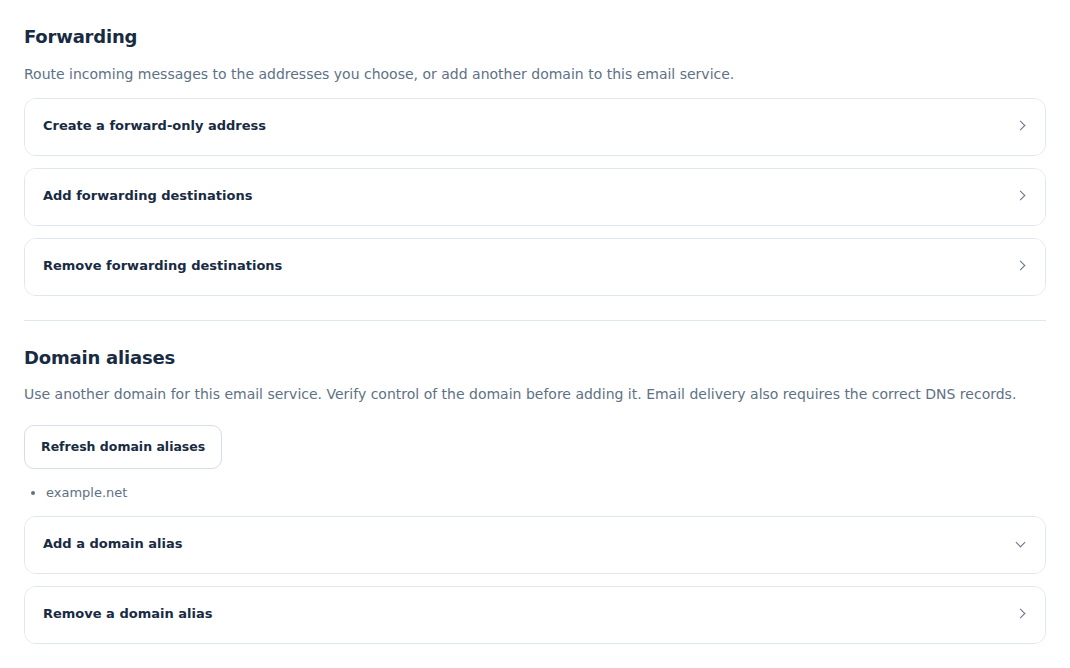 Manage email forwarding for the service
Guide certificates from request to download
Make certificate setup a visible sequence in the customer's account. Start with the verified SSL service, submit the CSR and required details, then follow the supported domain-verification method. The workspace keeps enrolment, verification and the issued result together, giving the customer a clear place to check progress. Once the certificate has been retrieved and verified, the download is available for installation through the customer's hosting tools. A later reissue follows its own request and result, so certificate maintenance remains connected to the same customer service.
- CSR validation and supported certificate enrolment details
- Email/CNAME/HTTP verification where the certificate permits it
- Issued-certificate readback and download
- Reissue and verification-method/email changes
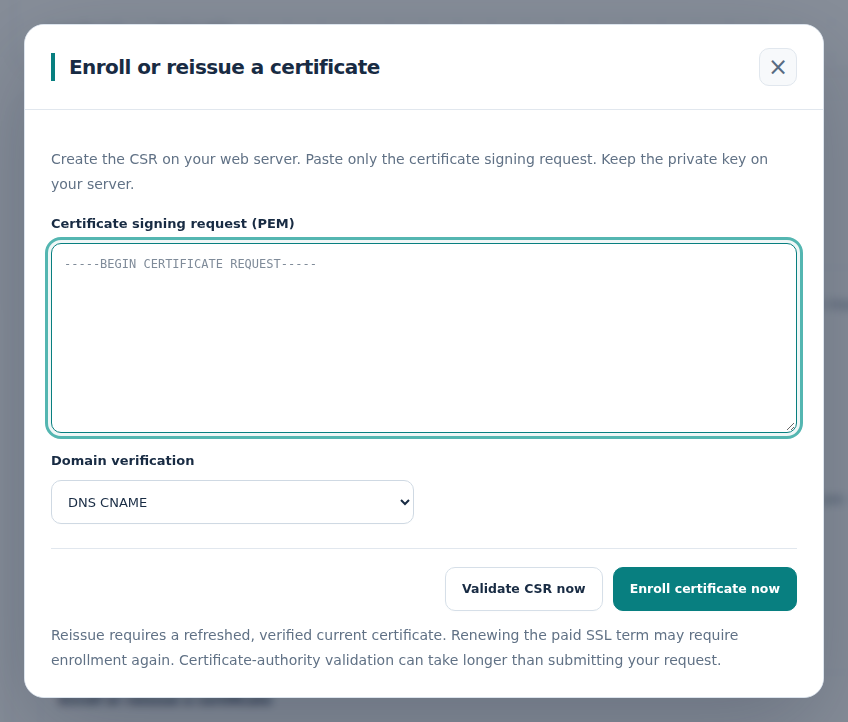
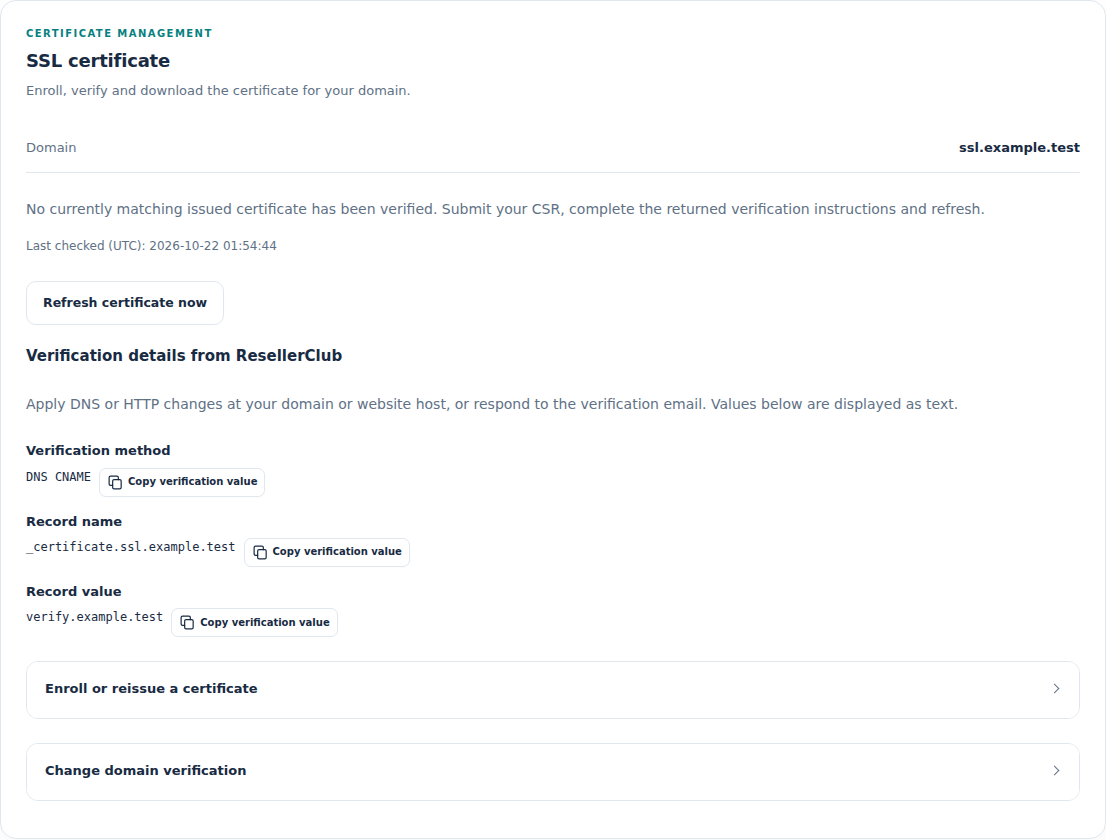 Follow the certificate’s current state
Grow the account after the first order
Give customers a considered route to more capacity or another service. Compatible addons retain their own order, payment, expiry and management alongside the parent product. Supported hosting and email growth, Titan changes and reviewed SSD KVM upgrades follow the requirements of their specific provider contracts. For an eligible purchased email addon, the customer can review a larger package, its change charge and the new recurring price before paying a dedicated invoice. The workflow follows supplier confirmation through to the recorded native update, so the expansion remains connected to what the customer agreed to buy.
- Independent native addon purchase, renewal and cancellation
- Supported shared/reseller and US email package growth
- Reviewed Titan seat/tier and eligible SSD KVM growth
- Dedicated paid-change workflow for supported email addons
Follow every order through to its outcome
Connect the commercial event to the work that delivers it. Purchases and renewals use the relevant settled WHMCS invoice, customer association and approved supplier plan before proceeding. The operating views keep the original request and its progress available while the provider confirms the result. Staff can follow service changes and cancellations, inspect a held request and use the appropriate reconciliation path when an outcome is uncertain. Customers see a useful status in their account, and the team has the context to resolve the next step without starting the same work again blindly.
- Invoice-aware purchase, renewal and lifecycle workflows
- Exact customer, order, plan and domain associations
- Recorded processing, verification and review states
- Scoped recovery plus service and addon cancellation tracking

 Review the planned provisioning work
Bring operations and commercial review together
See your ResellerClub services from the operating and commercial sides. Provider-status checks and certificate monitoring can surface incidents and feed scheduled reports, while analytics help staff review the catalogue and its recorded activity. Imported supplier statement entries can be assigned to the relevant service or addon invoice for a more grounded review of the transaction. The finance tools add invoice allocation, independent review and a recorded handoff to native refund processing. The workspace gives each decision its relevant context and keeps follow-up visible to the team.
- Provider-state and SSL monitoring with incidents and scheduled reports
- Scoped catalogue/service analytics
- Imported supplier statements and exact invoice assignments
- Invoice contribution, refund review and wallet information
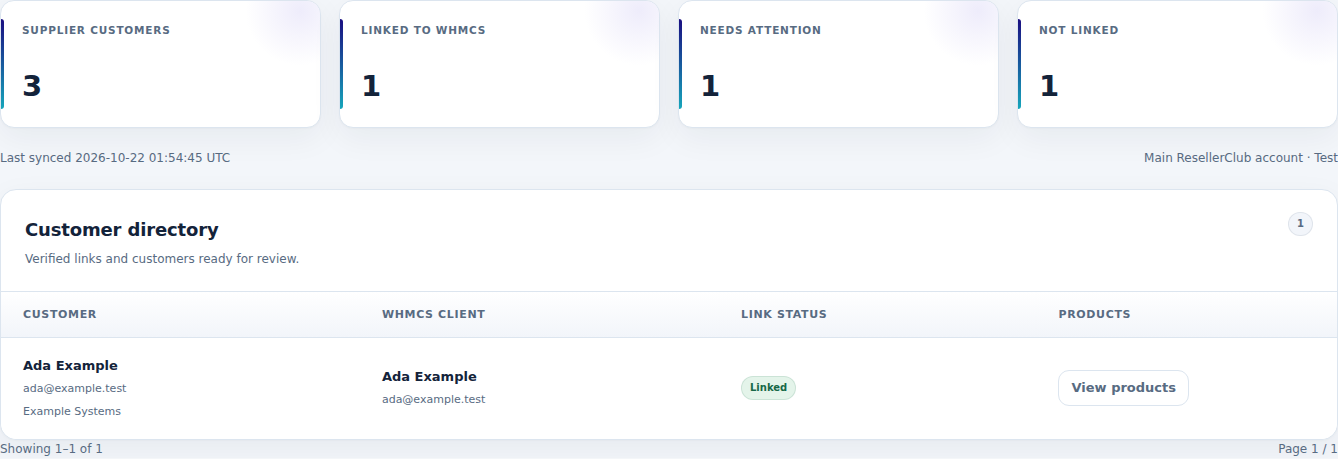
 Review incidents that need attention
Put backup and security tools within reach
Give customers a clear route from their WHMCS service to the specialist tools included in a supported Xcitium Backup or website-security plan. The service workspace checks the active customer and order, then generates a temporary entry to the approved provider console. Eligible purchased addons use the same service context, keeping the extra product easy to find beside its parent service.
In the backup console, customers can connect website files and databases, choose schedules, review storage and use the restore or download tools their plan provides. The security console supplies site setup, scan results and the purchased protection controls. WHMCS remains the familiar destination for the order, billing and service status, with a direct route into those provider tools.
- Xcitium Backup and supported website-security console access
- Temporary logins for verified active services and compatible addons
- Clear handoff to provider backup schedules, storage and restores
- A customer route to plan-specific scans and protection controls
Give Workspace customers a clear setup path
Help customers turn a connected Google Workspace order into an account they can start using. For a newly registered order, the service workspace presents the first-administrator form with the domain email, separate recovery address and required business details. The setup result stays beside the service, and available provider information shows the reported account-license count.
A direct link to Google Admin gives the customer the next step: sign in with their administrator, obtain the domain-verification and Gmail-activation records, then complete the required DNS work. Ongoing users, aliases and account settings stay in Google's tools. For transferred orders or established accounts, staff can record confirmed administrator access and keep the customer's setup history together.
- First-administrator setup for supported newly registered orders
- Domain, recovery-email and business details in one guided form
- Visible setup outcomes and available account-license information
- Google Admin entry with domain and email-activation guidance
A closer look at what’s included.
Explore the tools inside ResellerClub Manager, grouped around the work they help you do.
Product families
- Supported shared and reseller hosting
- Cloud, business and WordPress hosting plans
- Business/Enterprise and Titan email
- SSL, website security and backup services
- Selected VPS and dedicated-server offers
Native commerce
- Account-aware catalogue discovery
- WHMCS groups, products and configurations
- Compatible independent addons
- Initial and renewal cost review
- Margin, markup, currency and publication controls
Customer workspace
- Service overview and plan context
- Family-specific tools and guidance
- Supported hosting/WHM panel entry
- Billing, invoice links and service records
- Relevant illustrated Help Center
Email and certificates
- Supported direct mailbox administration
- Forwarding and verified domain aliases
- Email DNS information and Titan console entry
- CSR, enrollment and domain verification
- Issued-certificate download and reissue
Service growth
- Supported hosting and reseller upgrades
- US email package growth
- Eligible Titan seat and tier changes
- Reviewed SSD KVM growth
- Paid email-addon change workflow
Ongoing operations
- Invoice-linked purchase and renewal
- Service and addon cancellation tracking
- Provider-state and certificate monitoring
- Supplier statement assignment
- Finance review, activity and recovery tools
From the first action
to a useful outcome.
Follow the tasks inside ResellerClub Manager. See which tools come into play and what the finished workflow delivers.
Publish a product family
Build an intentional catalogue with the right commercial and service relationships.
Explore the interface- Refresh the account’s available plans
- Choose the exact products, terms and compatible extras
- Review retail prices and native product outcomes
- Publish the selected offers and follow their orders
Set up a customer’s email service
Put everyday email administration beside the customer’s service information.
Explore the interface- Open the purchased email workspace
- Create and maintain the supported mailboxes
- Set forwarding or verify an additional domain alias
- Use the provider-returned DNS guidance to finish setup
Guide an SSL certificate to issue
Give customers one clear place to manage their certificate lifecycle.
Explore the interface- Open the SSL service and submit the CSR details
- Complete the supported domain-verification step
- Follow the certificate’s issuance progress
- Download the issued result and use the reissue tools when needed
Build from the plans your account offers.
Connect the ResellerClub account, select the product families and review their native WHMCS presentation. Set the pricing and fulfillment policies, then explore the customer tools and guidance associated with each service.
- Connect the account and review product coverage
- Select native products, configurations and addons
- Set prices and review publication
- Configure customer tools, monitoring and staff access
Try ResellerClub Manager free for 7 days.
Explore the module with the workflows that matter to your business. Review a catalogue plan, explore the email and certificate workspaces and follow an order’s operating views. Use the seven-day trial to get familiar with the experience, then continue with an annual licence when you are ready.
- Start your 7-day module trial
- Configure the features you want to explore
- Follow a practical customer or staff workflow
- Continue with the annual licence
See what’s new.
Explore new capabilities, improvements and fixes. Every published release includes its version, date and change details.
Keep up with ResellerClub Manager.
Open the changelog to read published release notes and explore the product’s development over time.
ResellerClub Manager Answer Studio
Good questions.
Better answers.
Explore what ResellerClub Manager can do, how it fits your WHMCS, and the details that matter before you get started.
Tell us what you want to offer your customers. We can help you explore the capabilities and plan your next step.
Contact Nabtech ↗01Which services can I sell through the module?
The catalogue covers supported shared, reseller, cloud, business and WordPress hosting; Business/Enterprise and Titan email; SSL, security and backup products; and selected server families. Review the plans and regions available to your connected account, then choose the offers your business wants to publish.
02Do customers get dedicated service pages?
Yes. Each connected service has a family-aware workspace for its overview, management tools, billing and plan, service records and help. Hosting services expose the appropriate access route, while email and certificates present their own specialized tasks and guidance.
03Can customers manage email directly?
Supported US Business and Enterprise Email services and connected addons provide mailbox, profile, password, forwarding, alias and DNS tools in the workspace. Titan uses its own temporary console entry and capacity workflow, so each customer receives the management route appropriate to the purchased email product.
04How does SSL management work?
The customer opens the SSL service, submits a CSR and the required enrollment details, then follows the available domain-verification method. The workspace keeps issuance progress, certificate retrieval, download and later reissue together. The downloaded certificate can then be installed through the customer’s hosting tools.
05Can I offer addons and larger plans?
Compatible native addons retain their own purchase, renewal and cancellation lifecycle alongside the parent service. The suite also provides supported hosting/email growth, Titan seat or tier changes and reviewed SSD KVM changes. Eligible purchased email addons have a dedicated quotation and change-invoice workflow.
06What do the staff operating tools include?
Staff can follow provisioning, renewals, changes and cancellations through their recorded requests and results. Monitoring surfaces provider-state and certificate incidents. Commercial views add supplier statement assignment, invoice contribution and financial review, keeping the relevant context close to the service.
07Can I try the module before buying?
Yes. Start the seven-day free trial of ResellerClub Manager and explore the features through a workflow relevant to your business. The trial page explains the terms and starting steps. The annual licence is available when you decide to continue.
08Where can I see product updates?
The current version is shown on this page, and the Changelog opens the release notes. Each published release explains its new capabilities, improvements and fixes. You can read the notes in the page or open the full release history when you want to follow the product over time.
09Can I publish a selected range instead of the entire provider catalogue?
Yes. Catalogue discovery starts with the plans available to your connected ResellerClub account, and you choose the exact products, terms and compatible extras to offer. Native products can be staged hidden while you review their names, prices and resulting configuration. Publication then follows the range your business has selected.
10Does pricing account for both initial purchases and renewal costs?
Yes. The pricing review includes the supplier's initial and renewal costs, helping you assess an offer beyond its first sale. Margin, markup, manual prices, buffers and rounding controls support your retail policy. You can review the cost basis and customer price before publishing the associated native WHMCS offer.
11Can different product families use different pricing rules?
Yes. Shared policies provide a starting point, with family and product overrides for offers whose economics differ. The currency tools include reviewed native or manual exchange rates and an optional scheduled reference-rate source. This lets you maintain the selected hosting, email and other supported products using the commercial rules appropriate to each offer.
12How are supplier cost changes reviewed before they affect my offers?
Cost-age, cost-movement and price-ownership controls help staff review changes to the source costs and exchange-rate context. The team can assess the resulting retail prices before updating the catalogue. Existing customer contracts remain under their own control as you maintain the offers intended for future orders.
13Can hosting customers open their control panel from WHMCS?
Eligible hosting services provide the appropriate hosting-panel or WHM entry from their customer workspace. Access follows active-service checks, the connected provider order and the customer's permissions. The service page also keeps the plan, billing information, records and help close to the tools the customer is opening.
14Can an email customer add a domain alias or a forwarding-only address?
Supported US Business and Enterprise Email services and connected addons include forwarding, forward-only addresses and domain-alias tools. An additional domain must pass the ownership-verification workflow before its alias is attached. Customers can also review the provider-returned DNS information and action history for that service; the available tools depend on the email product purchased.
15Where do customers set backup schedules or restore a website?
For supported Xcitium Backup services and compatible addons, the WHMCS workspace checks the active service and provides temporary entry to the provider's backup console. Customers use that console for the website files, databases, schedules, storage and restore or download tools included in their plan. WHMCS retains the order, billing and service-status context.
16How do customers reach their website-security tools?
Supported website-security services and compatible addons provide a temporary console entry from the verified customer service. The provider's console supplies site setup, scan results and the protection controls included in the purchased plan. This gives customers a clear route to their security tools from the same WHMCS account they use for billing and service information.
17How does a connected Google Workspace customer get started?
For supported newly registered orders, the workspace presents a first-administrator form with the domain email, recovery address and required business details, then records the setup outcome. Customers continue in Google Admin to obtain verification and Gmail-activation records and complete the required DNS work. Ongoing users, aliases and account settings stay in Google's tools; established or transferred orders have a staff-recorded access workflow.
18How can staff follow an order whose provider result is still pending?
The original request remains available with its customer, order, plan and domain associations, alongside processing, verification or review status. Staff can inspect held work and use the relevant reconciliation path to establish the supplier outcome. Purchases and renewals retain their settled-invoice context, helping the team connect the commercial event to the service being delivered.
19Can supplier statement entries be connected to customer invoices?
Yes. Imported supplier statement entries can be assigned to the relevant service or addon invoice for commercial review. Invoice-contribution information and recorded finance follow-up keep that evidence beside the customer transaction. This gives the team a more useful starting point for reviewing costs and resolving a billing question.
20Can customers change how they verify an SSL certificate?
Where the certificate permits it, the SSL workspace includes verification-method and verification-email changes. The available methods can include email, CNAME or HTTP verification, according to the certificate's requirements. Customers can follow the updated verification and issuance progress in the service, then retrieve the issued certificate for installation through their hosting tools.
No questions match that search. Try a different word or explore all topics.
See the difference.Try it in your WHMCS.
Give ResellerClub Manager a place in your WHMCS. Start a seven-day free trial and explore the capabilities that matter to your business before buying.