AI hosting.WordPress power.Inside WHMCS.
Give customers AI that works with their hosting account, dedicated WordPress management and website AI. Bring websites, mail, files, databases, DNS and supported panel tools into their WHMCS client area.
Look closer. See what you can do.
Look inside the product, explore its capabilities and see how the work comes together.
Ask the hosting account’s AI engineer
Describe a hosting problem in the customer workspace. The engineer can investigate the account’s domains, DNS, email, databases, SSL, PHP, files and scheduled tasks through the available hosting tools.
Explore this capabilityA hosting account customers can work with.
The hosting workspace combines direct control with assistance in context. Customers can complete familiar account tasks themselves, ask the Hosting Engineer for help, or open the WordPress workspace to manage and improve a website. You choose the tools, AI settings and commercial policies each plan offers.
AI for the account
Inspect hosting settings and problems, review proposed work and apply approved actions through the service’s available tools.
WordPress and website AI
Manage installations, plugins, themes and backups, then use specialized AI for website creation, content and diagnosis.
Everyday hosting control
Give customers mail, domains, files, databases, usage and available DNS, PHP, SSL and developer tools in WHMCS.
Application products
Turn WordPress or an available Softaculous application into a plan with its own tools, installation policy and pricing.
Website care
Connect health, traffic, errors, backups, performance and scheduled maintenance to the website workspace.
Commercial and branded experience
Configure renewal choices, customer hosting trials, product tools and an optional branded website portal.
An AI engineer for the hosting account.
Let customers explain what they need while their hosting service is already open. The Hosting Engineer can inspect the account, work through a problem and use the operations available to that service. It can help with domains, mailboxes, databases and the supported DNS, files, PHP, SSL, cron and diagnostic tools your plan provides.
Customers see the proposed work and can approve changes before they are applied. The assistant follows the result in the same account context. You choose the AI providers, usage policies and credit options, giving the assistance a clear place within your hosting offer.
- Account-aware conversation and inspection
- Native hosting operations for the selected service
- Visible proposed actions and customer approval
- Provider, usage-budget and credit-pack controls

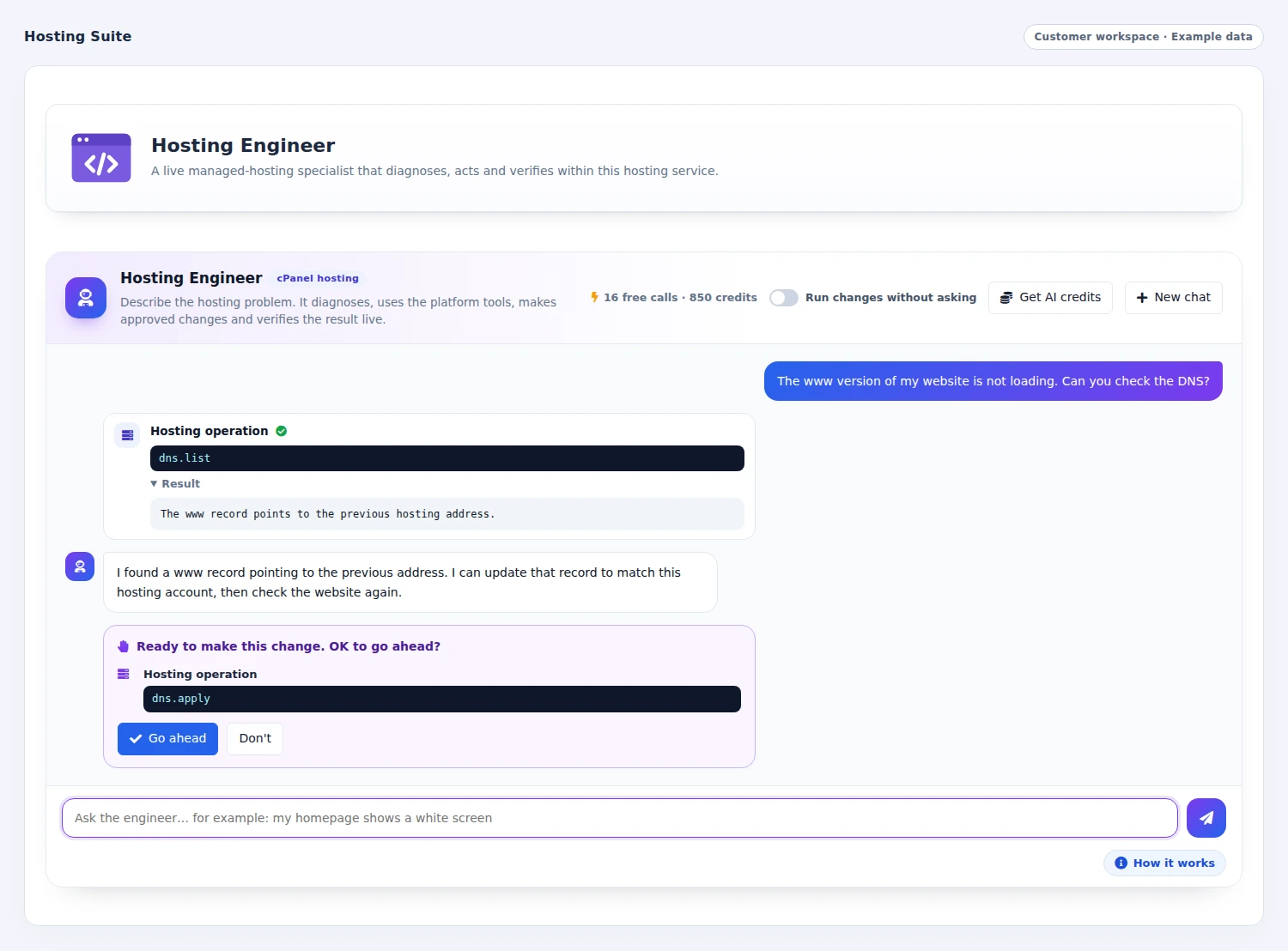 Review an AI-proposed hosting change
WordPress management, with AI built into the website workflow.
Give WordPress a dedicated place in the customer account. Manage installations, themes, plugins, updates and backups, open the administrator area and use the available cloning, synchronization and security controls. Website details and activity stay connected to the installation being managed.
A specialized WordPress Engineer brings AI assistance to that site. The AI website tools extend the experience into planning and building pages from a brief, writing or improving content, translation, SEO and website diagnosis. Customers can move from maintaining their site to developing it further, with the tools and usage allowance included in their plan.
- Installations, plugins, themes and updates
- Backups, clone/sync and available security controls
- WordPress-specific AI Engineer
- AI page creation, writing, translation and SEO
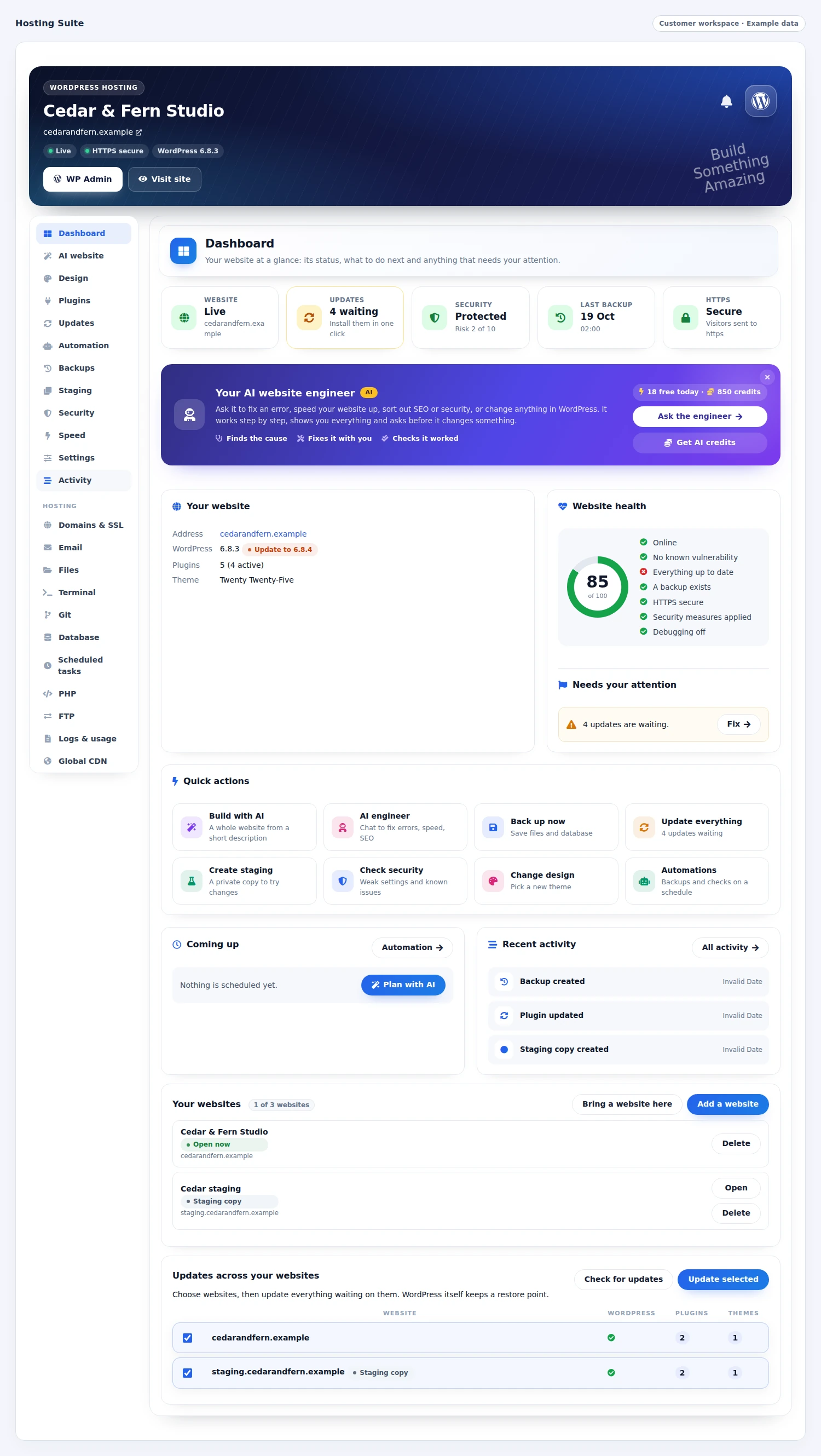
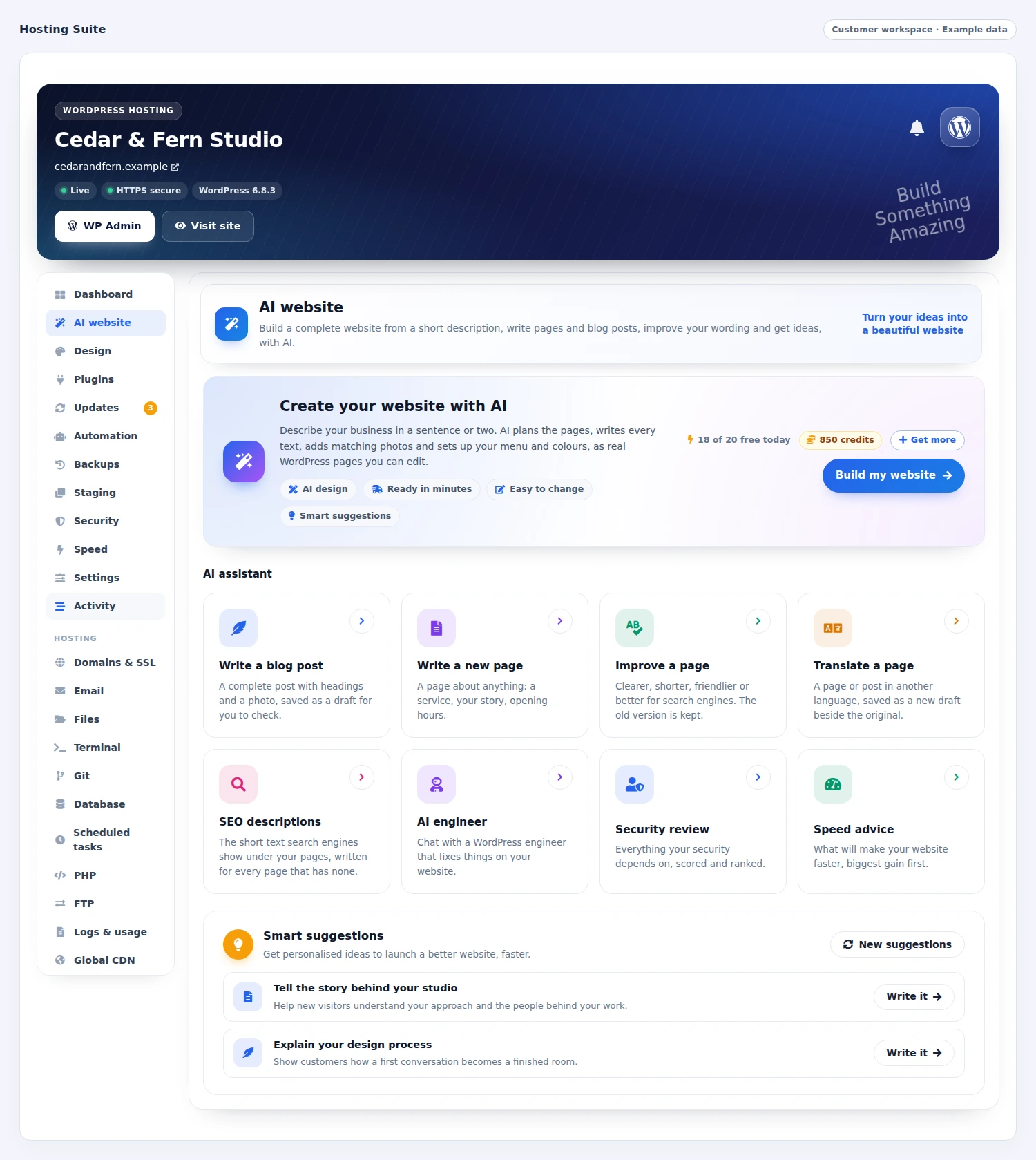 Create and improve a WordPress website with AI
Put everyday hosting tasks within reach
Give customers the tools they need where they already manage their service. They can create a mailbox, connect a domain, work with files, manage databases and check the resources their account uses. On supported cPanel accounts, the workspace goes further with DNS editing, PHP settings, cron jobs, SSL controls and developer tools. You decide which tools each product offers, and the suite checks the account's capabilities before presenting an action. A starter plan and a developer plan can therefore feel appropriately different while sharing the same familiar service experience.
- Domains, mail, files and databases organized by task
- Product-level tool selection
- Available server tools surfaced in context
- Resource information and direct sign-ins where permitted
Let customers try your products before they pay.
Turn selected paid WHMCS products into a free-trial offer. Choose the products customers can try, set a shared trial period or give individual products their own duration, and decide whether that free time comes before the first paid billing term. Set limits per cart and customer, restrict an offer to new customers when needed, and control whether a customer can try the same product again.
Carry the offer from the product list to the customer’s service. Branded trial labels appear on product cards, the configure page and the order summary. Eligible customers choose the trial option at checkout and start without an upfront payment. Their service shows the trial deadline and the invoice that keeps it running, while welcome and reminder emails explain the next step using your WHMCS templates.
Keep the trial and paid service connected. Paying the invoice converts the trial into normal paid service; an unpaid expiry pauses the service, with a payment route to continue. Your team can review running, paid and ended trials, extend an eligible deadline or end a running trial. Dates, invoice status and recorded events stay together, so staff can help a customer continue with the product they have already tried.
- Trial access for selected paid WHMCS products
- Shared duration and individual product overrides
- Cart limits, customer limits and repeat-trial rules
- Branded product labels and a no-payment trial checkout
- Visible service deadline and normal WHMCS payment invoice
- Welcome, reminder, conversion and trial-ended emails
- Payment-based continuation and unpaid-expiry handling
- Staff trial lists, extensions, ending controls and event history
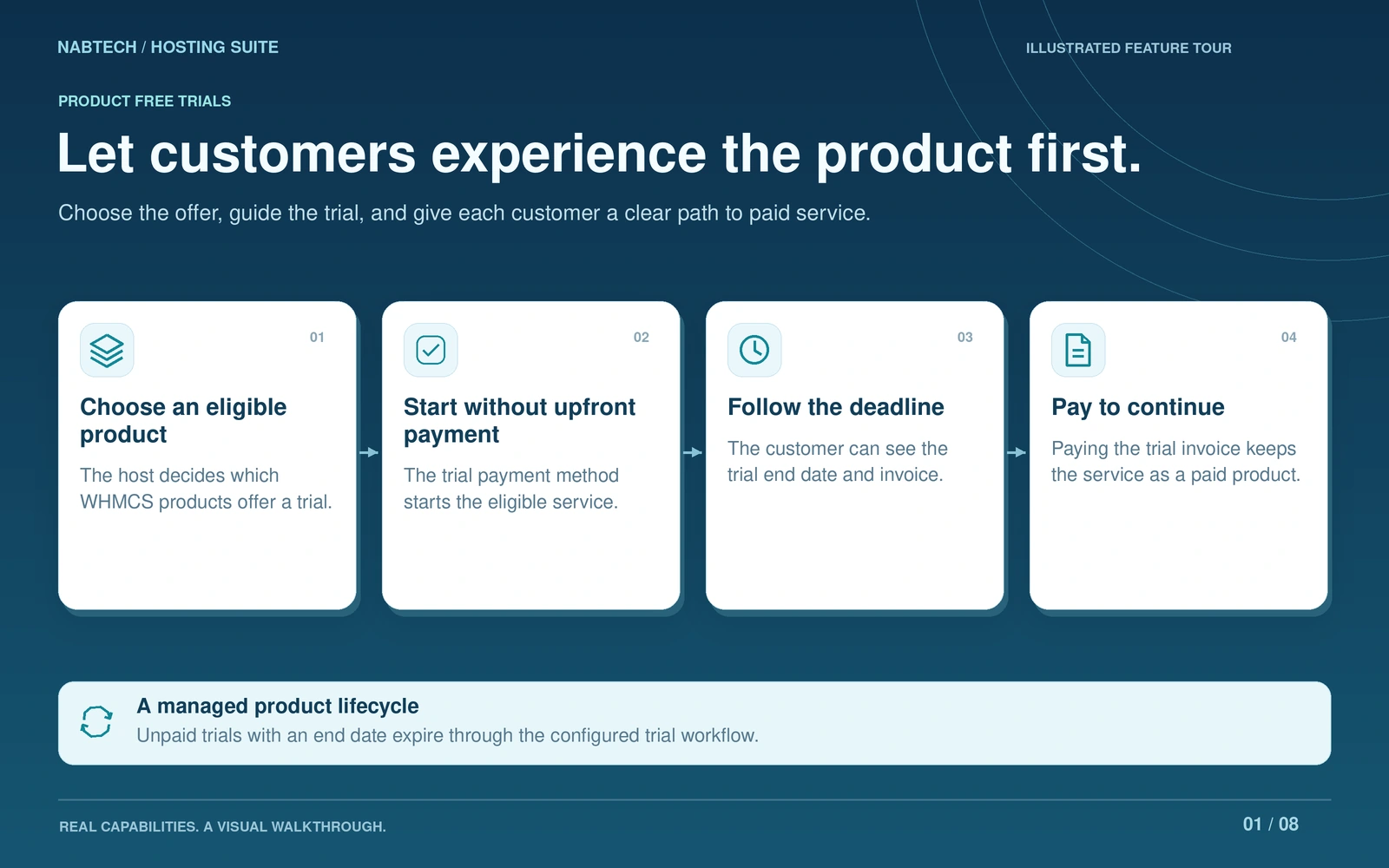
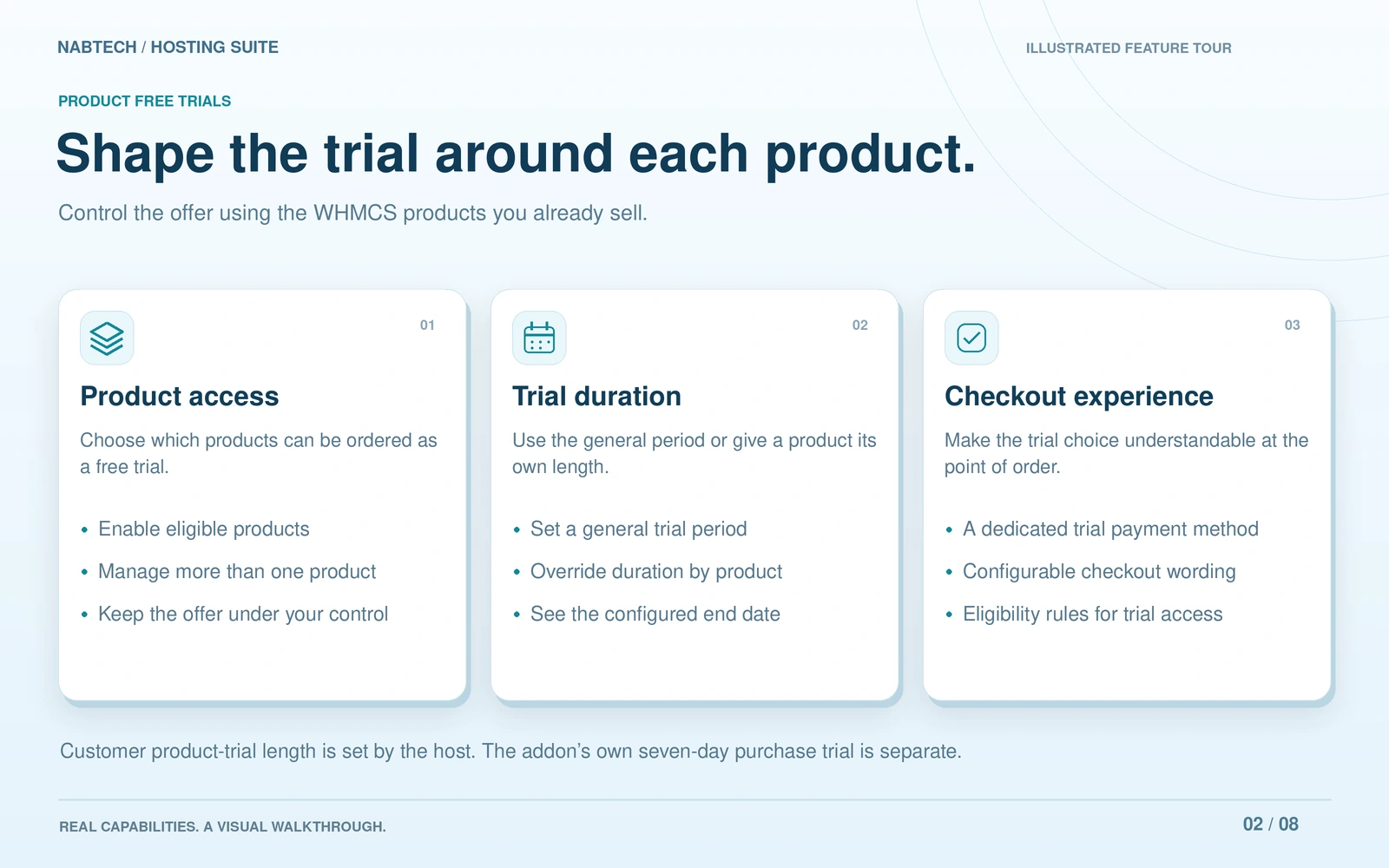 Choose the products and trial rules
Make the next term a clear customer choice.
Bring a complete renewal journey into the hosting service page. Let customers renew for one billing period or several periods upfront, move to an allowed billing cycle and choose whether renewal invoices are created automatically. You define the available terms, cycle transitions and invoice timing for each product. Customers can keep reminders on and schedule a future cycle change when automatic renewal is enabled.
Show the decision before asking for confirmation. The renewal dialog presents the current and proposed due dates, selected period, discounts, future billing cycle and future recurring amount. An invoice preview adds the exact tax and total. Once the customer confirms, the renewal becomes a normal WHMCS invoice paid through your usual gateways. The service’s dates and agreed cycle change take effect after the invoice is paid in full.
Build the renewal offer around your commercial rules. Use the service’s recurring price, catalogue pricing or configured term prices, with rules for particular services, customers, groups or products. Offer eligible early-payment or cycle-change discounts, and include eligible linked domain or addon renewals in the same invoice when the product permits them.
Give staff the same context customers see. Renewal Studio brings service preferences and scheduled changes together; Renewal Operations follows invoices and completed renewals. Customer history, configurable reminder emails and recorded outcomes make the next action easier to understand, with routine invoicing, reminders and paid-service updates handled by the normal WHMCS cron.
- Product-specific terms, upfront renewal and cycle choices
- Explicit automatic-renewal invoicing preferences
- Due dates, discounts and future recurring amount shown before confirmation
- Invoice preview with tax and the exact payable total
- Scoped price rules and early-payment or cycle-change discounts
- Eligible domain and addon renewals on the same invoice
- Reminder schedules, customer history and future cycle changes
- Renewal Studio and Renewal Operations for staff
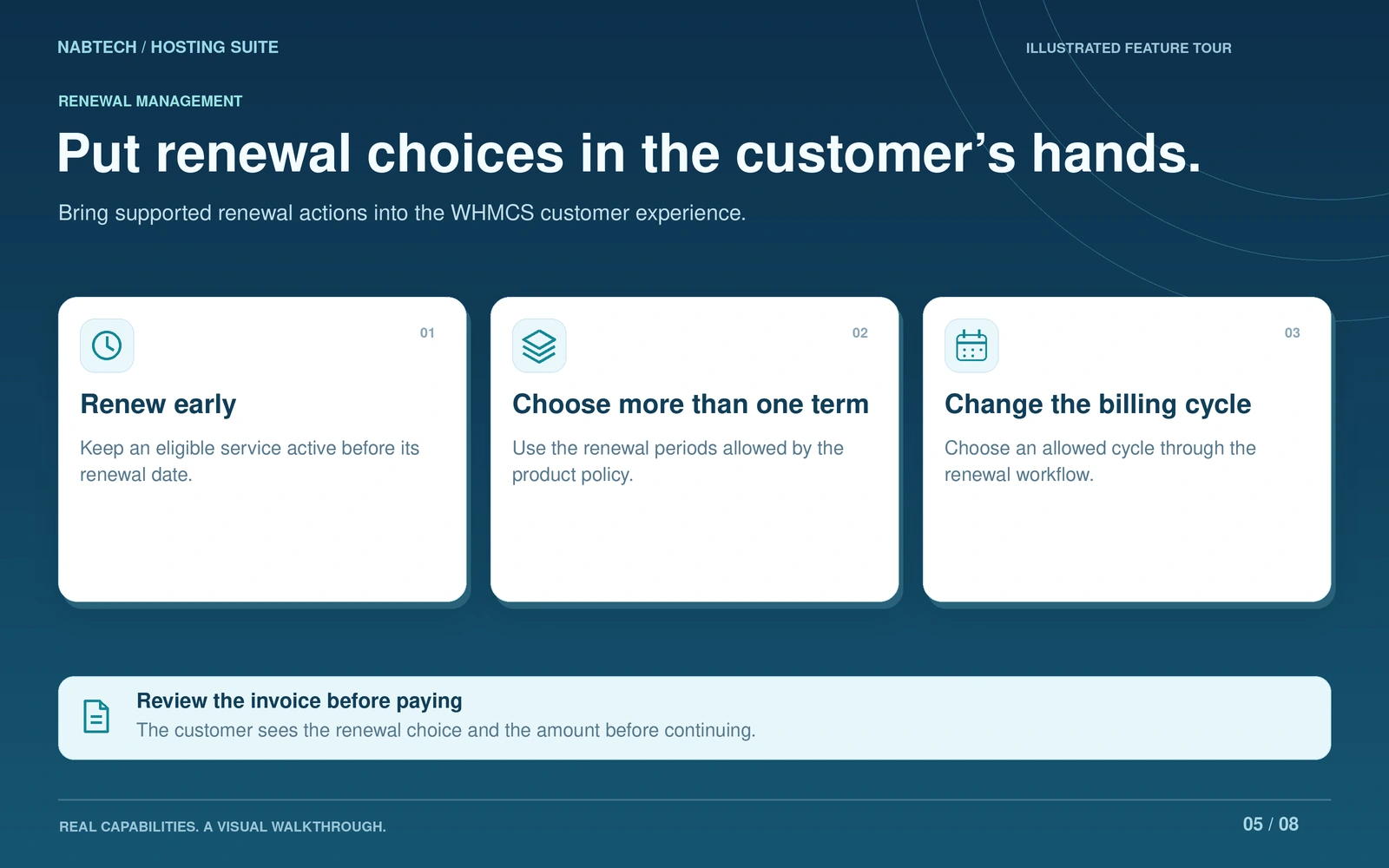
 Shape terms and pricing for each renewal product
Turn applications into products
Sell the application your customer came for with a plan built around it. Choose WordPress through WP Toolkit or an application available through Softaculous on an eligible cPanel server, then define the product's pricing, installation limits and supporting tools. Start with an Essentials, Business, Complete or Developer profile and adjust it to your service. The suite connects that plan to its application setup and customer workspace, so the offer has a clear identity from the product list to everyday use. Email, databases, PHP and other supporting tools remain choices you make for the plan.
- Application catalogue tied to an eligible server
- Plan creation with prices, setup fees and product groups
- Four editable starting profiles
- Installation and supporting-tool policies
Keep website care close to the work
Give customers a place to understand how their website is doing and act on the tools their plan provides. Health views bring together availability, response time and certificate information. Website Insights add traffic and resource context, while available server integrations expose malware tools, backups and performance controls. Customers can also schedule supported maintenance tasks and review their history. Bringing these views into the website workspace makes care part of the ongoing hosting experience, with the underlying server capabilities determining which actions each account can use.
- HTTP, SSL and resource visibility
- Website traffic and error information
- Available malware, backup and performance integrations
- Scheduled tasks and history
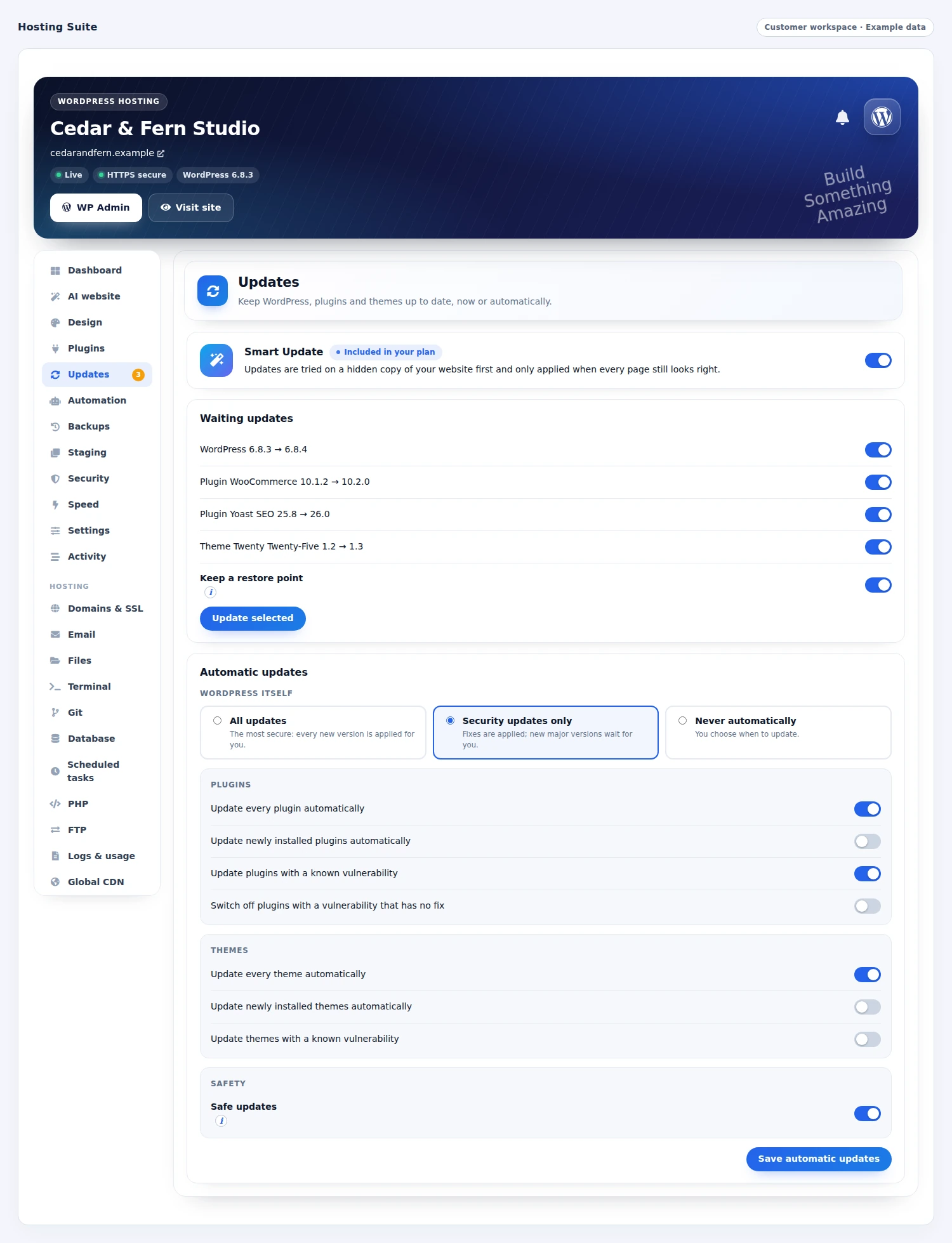
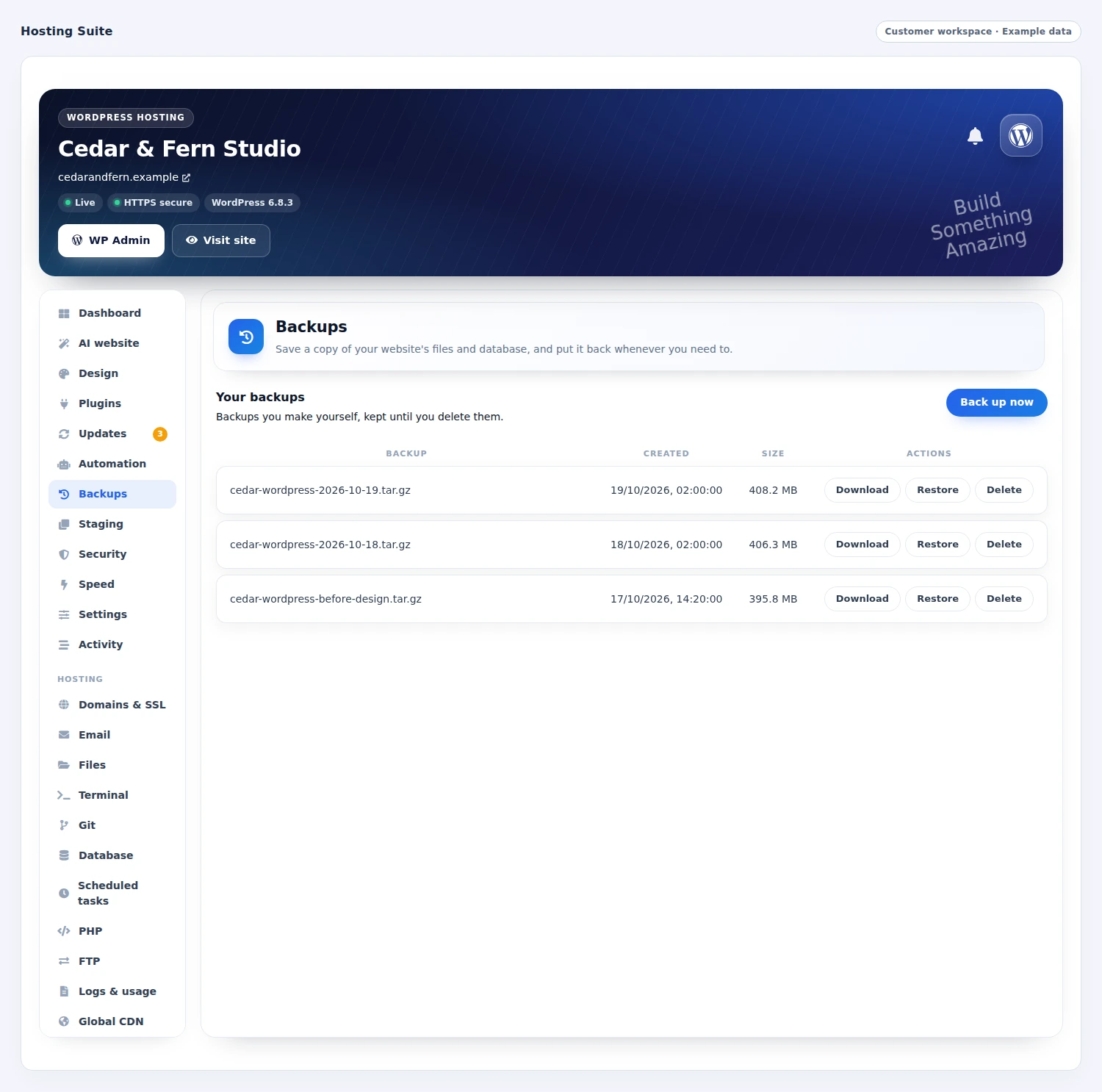 Keep WordPress recovery points close
Let customers choose their next term
Make renewal a clear decision. Set the terms a product can offer, decide how its price is calculated and define when customers may change cycle or renew ahead. The customer reviews a quotation before confirming the invoice, while their renewal preferences remain visible and deliberate. Your rules can include scoped discounts and eligible related items, and your team has an operations view for exceptions. This connects the offer, the customer's choice and the billing record in one workflow, giving you room to design different renewal experiences for different hosting products.
- Allowed terms, cycle transitions and upfront renewal
- Quotations before invoice confirmation
- Product and customer-specific commercial rules
- Preferences, reminders and billing operations
Give hosting customers time to try
Build a trial into the hosting offer itself. Choose the products customers can try, set the trial period and apply the eligibility limits that suit your business. Customers receive a visible deadline and a path to continue by paying their invoice. Reminder settings help explain what happens next, while your team can review trials, extend an eligible period or end a running trial. The lifecycle keeps payment and service status connected, with unresolved states available for staff attention. Use this to introduce customers to the actual hosting service you intend them to keep.
- Trial products, duration and eligibility rules
- Customer deadline and invoice visibility
- Reminder messages and conversion after payment
- Staff extension, ending and exception review
Give each customer the right entrance
Keep website management in the WHMCS client area, offer a separate branded portal or make both available. Choose whether access belongs to the customer or a specific website, then set the portal identity and the supporting tools each application plan includes. The same product decisions shape what the customer sees after signing in. Your team can adjust client styling, tool presentation, translations and messages from the workspace, helping a focused website plan feel different from a full hosting account while remaining part of one coherent service.
- WHMCS, portal or combined access
- Customer-level or website-level login models
- Brand, logo, favicon and portal address settings
- Product tools, client design and language controls
A closer look at what’s included.
Explore the tools inside Hosting Suite, grouped around the work they help you do.
Hosting account AI
- Service-aware diagnosis and inspection
- Available native account operations
- Proposed-action approval and results
- AI provider and model configuration
- Usage budgets and customer credit packs
Dedicated WordPress tools
- Install, scan, import and manage sites
- Plugins, themes and update policies
- WP Toolkit backups and restoration
- Available cloning, synchronization and PHP tests
- WordPress Engineer and AI website/content tools
Account management in WHMCS
- Domains, aliases and subdomains
- Mailbox passwords, quotas and available mail tools
- Files, FTP and databases
- cPanel DNS, PHP, cron and developer tools
- Resource usage and permitted panel/tool sign-ins
Supported hosting platforms
- cPanel account tools
- Plesk common account tools
- DirectAdmin common account tools
- Webuzo common account tools
- Virtualmin common account tools
Website and application services
- WP Toolkit and Softaculous application plans
- Application installation and onboarding
- Health, traffic, logs and PageSpeed views
- Available Imunify360, JetBackup and AccelerateWP tools
- Migration requests, file staging and scheduled care
Products and lifecycle
- Product-specific tool selection
- Renewal quotations and cycle choices
- Hosting-customer trials and staff review
- Related eligible renewal components
- Branded portal, languages and customer design
From the first action
to a useful outcome.
Follow the tasks inside Hosting Suite. See which tools come into play and what the finished workflow delivers.
Ask the Hosting Engineer to help
Offer practical AI assistance in the context of the customer’s own hosting service.
Explore the interface- Open the hosting account and describe the task
- Let the assistant inspect the service’s available tools
- Review and approve the proposed account change
- Follow the action and its result in the conversation
Build and care for a WordPress website
Keep website creation and day-to-day WordPress management in a dedicated customer workspace.
Explore the interface- Open the owned WordPress installation
- Use a website brief or content task with the AI tools
- Manage the site’s plugins, updates and backups
- Review health and schedule the available maintenance tasks
Create an application hosting offer
Give the application plan a clear identity from the offer to the customer’s workspace.
Explore the interface- Select an application on an eligible cPanel server
- Choose the plan profile, supporting tools and installation policy
- Set the native WHMCS product, terms and pricing
- Follow installation and customer onboarding
Shape the tools around the hosting plan.
Connect the supported hosting environment, select the customer tools and configure the AI providers you want to offer. Add the WordPress and website-care integrations available on the server, then review the customer experience for each product.
- Connect the hosting panels and select product tools
- Configure account AI and WordPress AI settings
- Enable the available website and application services
- Review customer access, branding and commercial policies
Try Hosting Suite free for 7 days.
Explore the module with the workflows that matter to your business. Explore account AI, open a WordPress workspace and try the everyday hosting controls on a suitable service. Use the seven-day trial to get familiar with the experience, then continue with an annual licence when you are ready.
- Start your 7-day module trial
- Configure the features you want to explore
- Follow a practical customer or staff workflow
- Continue with the annual licence
See what’s new.
Explore new capabilities, improvements and fixes. Every published release includes its version, date and change details.
Keep up with Hosting Suite.
Open the changelog to read published release notes and explore the product’s development over time.
Hosting Suite Answer Studio
Good questions.
Better answers.
Explore what Hosting Suite can do, how it fits your WHMCS, and the details that matter before you get started.
Tell us what you want to offer your customers. We can help you explore the capabilities and plan your next step.
Contact Nabtech ↗01What can the AI Hosting Engineer do?
The Hosting Engineer uses the operations available to the customer’s own service. It can inspect and work with supported domains, mailboxes, databases, DNS, files, PHP, SSL and diagnostic tools. Customers see proposed changes and can approve the work; the assistant then follows the result in the same account context.
02How is WordPress AI different from account AI?
Account AI works with the hosting service’s available control-panel operations. WordPress has its own specialized Engineer and website tools for a selected installation. Those tools include page planning and creation, writing, content improvement, translation, SEO and diagnosis alongside the site’s management controls.
03Can customers perform normal hosting tasks inside WHMCS?
Yes. Hosting Suite provides customer workspaces for domains, mail, files, FTP, databases, usage and permitted direct sign-ins. cPanel also exposes a broader set of DNS, PHP, cron, SSL, security and developer tools. You select the tools each product offers, and the customer sees those available to their account.
04Which hosting panels can I connect?
The suite includes adapters for cPanel, Plesk, DirectAdmin, Webuzo and Virtualmin. Common account tools follow the selected panel’s capabilities, with the broadest set of advanced tools on cPanel. Product-level settings let you shape which controls are offered on each hosting plan.
05What WordPress management is included?
The WP Toolkit workspace covers installation details, login, plugins, themes, updates and backups. Available server features add cloning, synchronization, security measures, PHP compatibility tests and maintenance controls. WordPress remains a dedicated website workspace with actions tied to the selected installation.
06Can I sell application-specific hosting plans?
Yes. Choose WordPress through WP Toolkit or an application available through Softaculous on an eligible cPanel server. The application-product workflow creates the plan with its pricing, installation policy and supporting tools, then connects installation and onboarding to the customer’s service.
07Are hosting-customer trials the same as the module trial?
They are two separate offers. Hosting Suite lets your business configure trial periods and eligibility for hosting products sold to your customers. The seven-day Nabtech module trial lets your team explore Hosting Suite itself before purchasing its annual licence.
08How do I manage AI usage and product updates?
Choose the AI provider and model configuration, set usage policies and decide how customer credit packs are offered. This lets you fit AI assistance to your hosting plans. The module’s visible Changelog provides the published versions, new capabilities and improvements as Hosting Suite develops.
09Can a customer start a WordPress page from a website brief?
Yes. The AI website tools can use a brief to plan and create pages for the selected WordPress website. Customers can also develop the copy, improve existing content, translate it and work on SEO. These tools sit alongside WordPress management, with availability and usage allowances determined by the plan you offer.
10Can I give starter and developer plans different tools?
Yes. Product-level tool selection lets you decide what each hosting or application plan includes. A focused starter plan can expose a smaller set of account tools, while an eligible developer plan can offer more advanced controls. The workspace also follows the connected account's capabilities, so the selected panel and available server features remain part of the decision.
11What can customers review when a website needs attention?
The website workspace brings together health information such as availability, response time and certificate status, with traffic, error and resource views where available. Customers can use the maintenance tools their plan provides and review scheduled-task history. This gives them a useful starting point for understanding a website problem and following the relevant care workflow.
12How do the backup, malware and performance integrations fit into a plan?
Hosting Suite surfaces the supported tools available through the server integrations you provide. These can include JetBackup, Imunify360 and AccelerateWP, alongside the site's other management controls. Choose the tools offered by each product and check their availability on the intended server when designing the plan. The customer workspace then presents the applicable actions in the service context.
13Can I offer a branded website portal as well as the WHMCS client area?
Yes. You can use the WHMCS client area, a separate branded website portal, or both. The portal settings cover its identity, logo, favicon and address, with customer-level or website-level access models. Product tools, styling, language and message settings help you shape the experience for a focused website plan or a broader hosting service.
14Can customer trial periods and eligibility differ between products?
Yes. Select the paid WHMCS products customers may try, then use a shared duration or an individual product override. You can set cart and customer limits, restrict an offer to new customers and decide whether repeat trials of the same product are allowed. These are the customer trials you offer through Hosting Suite, with their own commercial settings.
15How does a customer continue after trying one of my products?
The trial service shows its deadline and the WHMCS invoice used to continue. Paying that invoice converts the trial into normal paid service. An unpaid expiry pauses the service and retains a payment route to continue. Configured welcome, reminder, conversion and trial-ended emails explain the stage the customer has reached and the next step.
16Can staff extend a customer's trial and review its history?
Yes. Staff can review running, paid and ended trials, inspect the deadline and invoice status, and follow the recorded events. The controls include extending an eligible deadline or ending a running trial. Keeping that information together helps the team answer a trial question using the customer's actual service and payment context.
17Can customers renew ahead or choose a different billing cycle?
Yes, within the rules you set for the product. Customers can renew for one period or several periods upfront and move to an allowed billing cycle. They review the proposed term and dates before confirming a normal WHMCS invoice. The renewal dates and agreed cycle change take effect after the invoice is paid in full.
18What does the customer see before confirming a renewal?
The renewal dialog shows the current and proposed due dates, selected period, applicable discounts, future billing cycle and future recurring amount. Its invoice preview adds the tax and exact payable total. Customers can therefore review both the immediate invoice and the following billing arrangement before confirming the renewal through your usual WHMCS payment flow.
19Can renewal prices follow customer-specific rules or include related services?
Yes. Renewal pricing can use the service's recurring price, catalogue pricing or configured term prices, with rules for particular services, customers, groups or products. You can offer eligible early-payment or cycle-change discounts. Eligible linked domain or addon renewals can also share the invoice when the product's renewal settings permit them.
20How do automatic renewal preferences and reminders stay visible to staff?
Customers can choose whether renewal invoices are created automatically, keep reminders enabled and schedule an allowed future cycle change when automatic renewal is on. Renewal Studio brings those preferences and scheduled changes together for staff, while Renewal Operations follows invoices and completed renewals. Configured reminders and paid-service updates run through the normal WHMCS cron workflow.
No questions match that search. Try a different word or explore all topics.
See the difference.Try it in your WHMCS.
Give Hosting Suite a place in your WHMCS. Start a seven-day free trial and explore the capabilities that matter to your business before buying.