From the first offer to the next renewal.
Create campaigns, build bundles, recover unfinished carts and reward customers who return. Bring those buying journeys into WHMCS with audience rules, finance visibility and a shopping assistant that works from the products and offers you sell.
Look closer. See what you can do.
Look inside the product, explore its capabilities and see how the work comes together.
See campaigns and customer interest in one workspace
Review campaign activity alongside the domains customers search for, save and order, with paths into the related offer tools.
Explore this capabilityCommerce tools for every stage of the offer.
Offer Studio connects the campaign your team creates to the buying journey the customer follows. Set the audience and saving, present a useful package, support the decision and keep the relationship going through renewal and the next purchase.
Campaigns and audiences
Target the domain, product, addon or order with the conditions and saving it needs.
Bundles and presentation
Bring eligible plans, domains and extras into the same cart journey.
Saved choices and recovery
Help shoppers retain useful choices and return to unfinished carts.
Rewards and retention
Use loyalty, referrals, early-payment rewards and renewal offers.
Buying assistance
Guide shoppers through relevant products and available offers with the assistant.
Commercial results
Review scenarios, savings, finance context, experiments and customer response.
Build offers around what you actually sell
A domain transfer offer, a hosting launch and an order-wide promotion need different rules. Offer Studio lets you create campaigns for domains, products, addons or the whole order, then define the terms, audience and saving that fit the job.
Choose how customers receive the offer and how it interacts with other promotions. Use reusable audiences, codes or automatic eligibility to reach the right group. A single campaign workspace can therefore support a new hosting launch, a renewal promotion, an addon offer or a broader order incentive, with each offer shaped around the products and customers it is meant to serve.
- Products and terms
- Audience rules
- Saving and limits
- Publish the offer

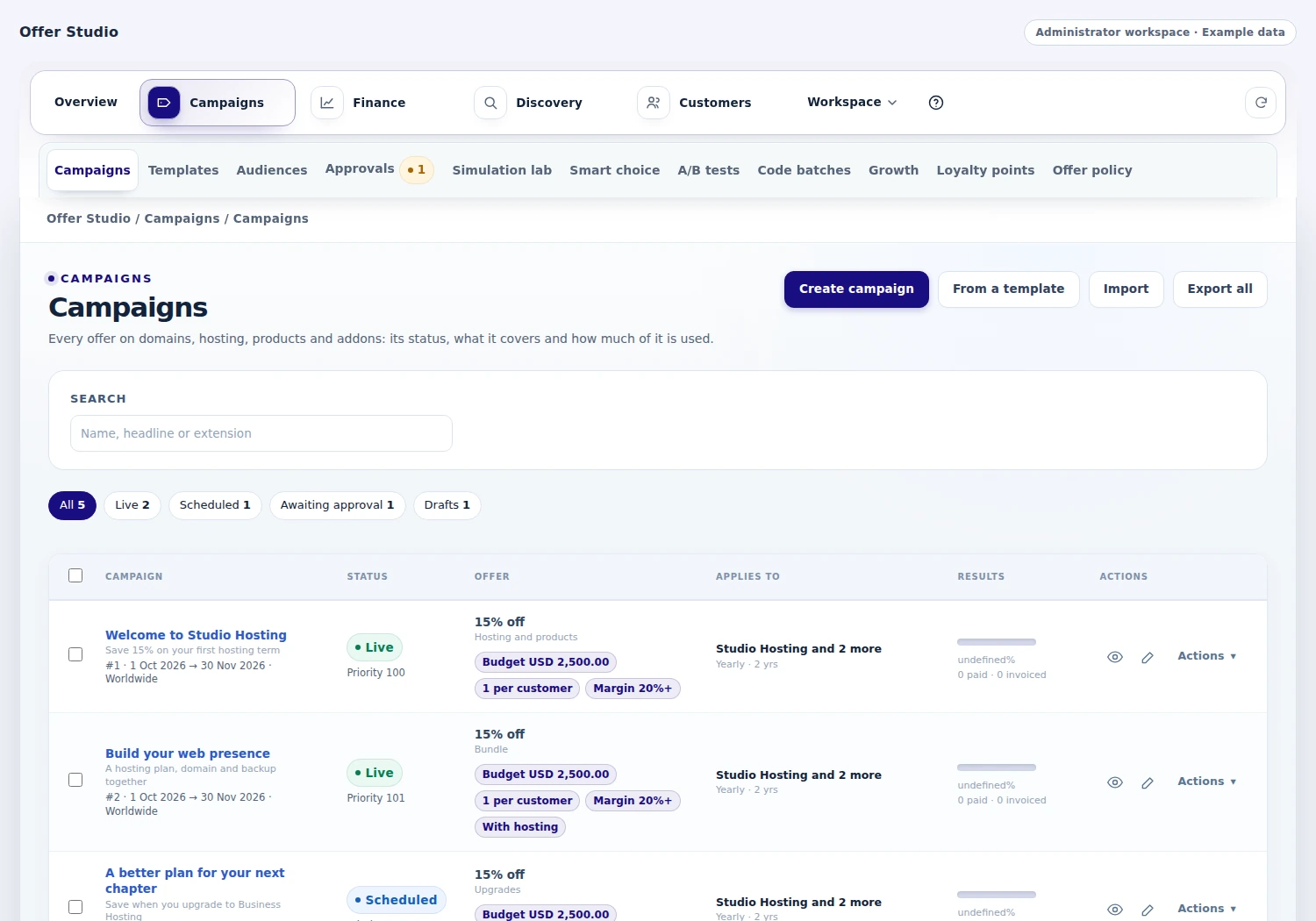 Manage the campaigns running across your shop
Know the saving before you publish it
Use the simulation lab to inspect a customer's scenario before a campaign goes live. Review the normal price, proposed saving, renewal context and the conditions that caused another offer to be rejected.
Cost and margin controls add a financial view where the required supplier information exists. Calculate-only and test-account modes let your team introduce the setup in stages, while approval settings determine who can publish. These tools give marketing and finance a shared way to understand the campaign. The operator can move from a rule to a concrete customer quote, with the price, saving and qualifying conditions visible before publication.
- Customer scenario
- Normal price
- Applicable saving
- Commercial context

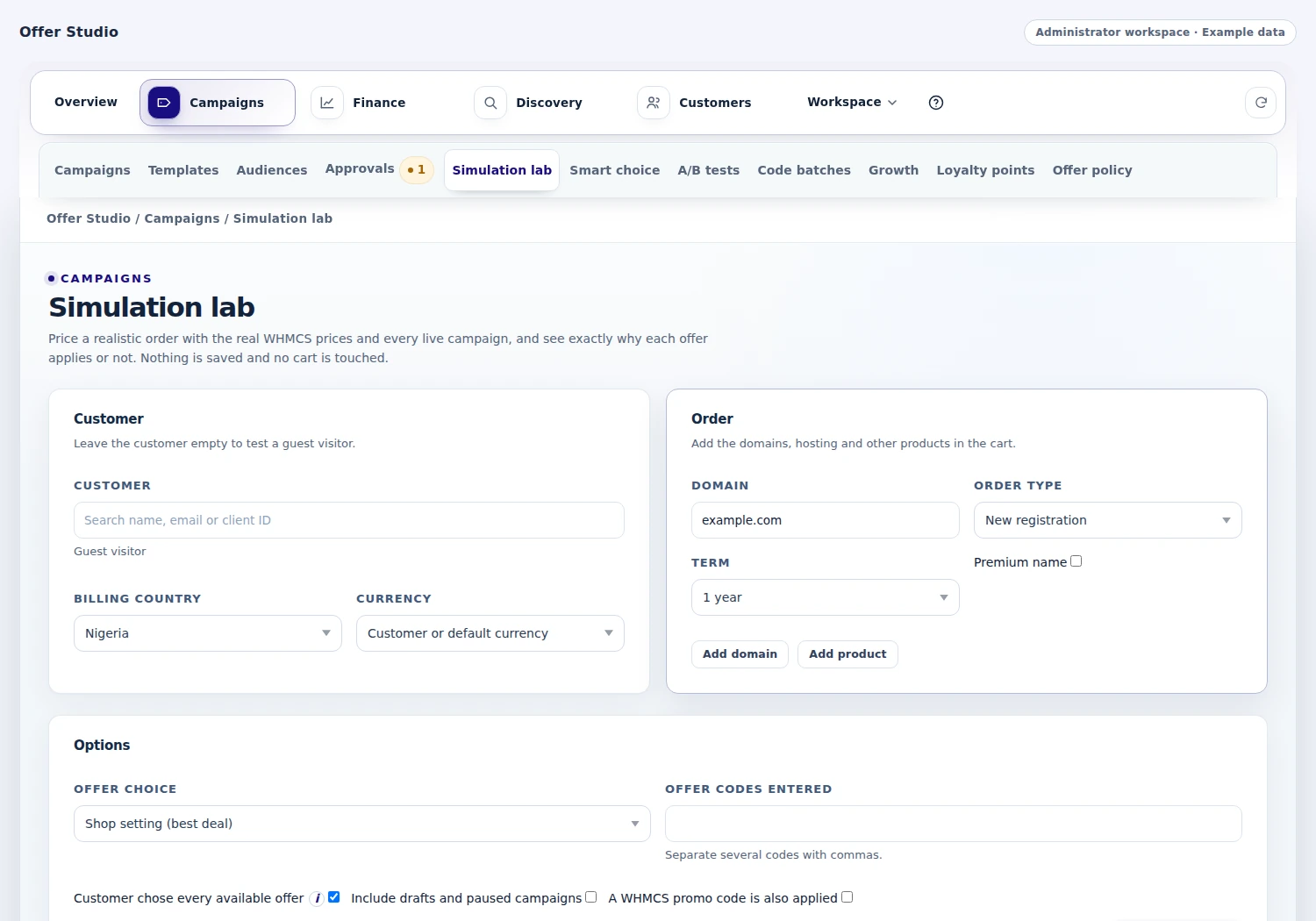 Test a realistic customer order
Make the plan, domain and extras one journey
Customers often need a complete setup: a hosting plan, a suitable domain and an extra service. Offer Studio's bundle builder can bring eligible selections into the same WHMCS cart flow, with the relevant domain and addon checks along the way.
Campaign rules can also connect a domain offer to qualifying hosting, define renewal savings and support volume or upgrade scenarios. Customers can assemble the items they need in a connected journey, while the offer rules determine the savings for those selections. Your business can present a useful package with the pricing and qualification behind it.
- Hosting plan
- Suitable domain
- Compatible extras
- Reviewed bundle
Bring unfinished carts back into the conversation
Give shoppers a way to keep their choices when they are not ready to finish. Saved-domain and saved-cart experiences preserve the useful part of the visit, and a guest can request a cart link by email.
Configured recovery steps can follow up on eligible unfinished client carts, while guest reminders use their own permission and handling. When the customer returns, the current catalogue and offer rules still decide what applies. Your team controls the timing and follow-up steps, while the shopper has a clear route back to the choices they wanted to keep.
- Save the selection
- Retain the cart
- Relevant reminder
- Return to checkout
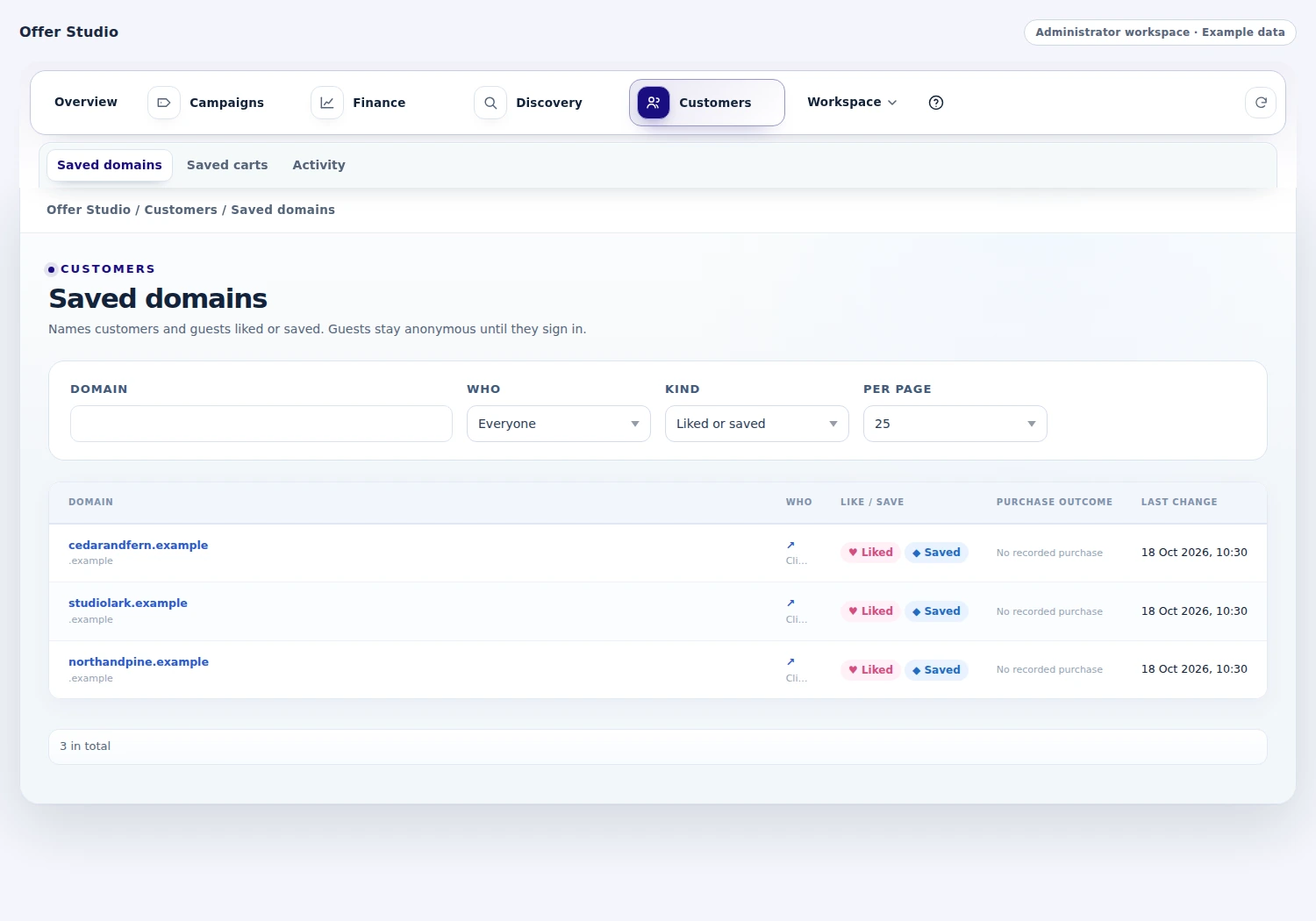
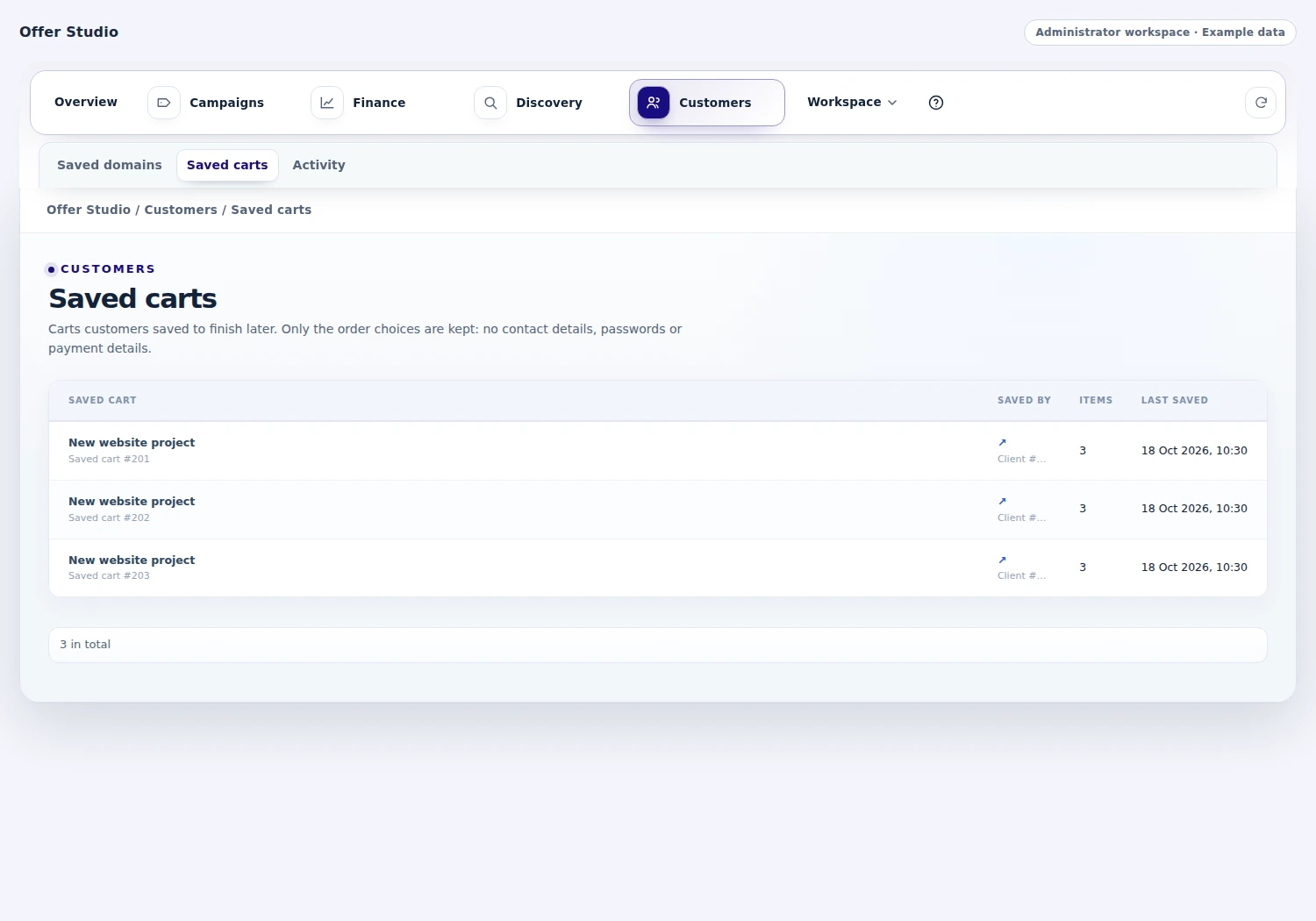 Follow unfinished customer orders
Give customers a reason to return
Offer Studio includes several ways to recognize an ongoing customer relationship. Loyalty points can turn eligible paid activity into account credit. Early-payment rewards can thank customers who settle qualifying invoices ahead of time. Referrals can reward a customer after the friend's order passes your configured checks and holding period.
Win-back tools address quiet or lapsed customers, while relevant service offers introduce useful next purchases. Choose the qualifying conditions and reward that fit each moment, then follow the customer's progress in the reward views and administrator history. The tools give your business several practical ways to encourage the next purchase.
- Eligible paid activity
- Loyalty points
- Referral progress
- Next purchase

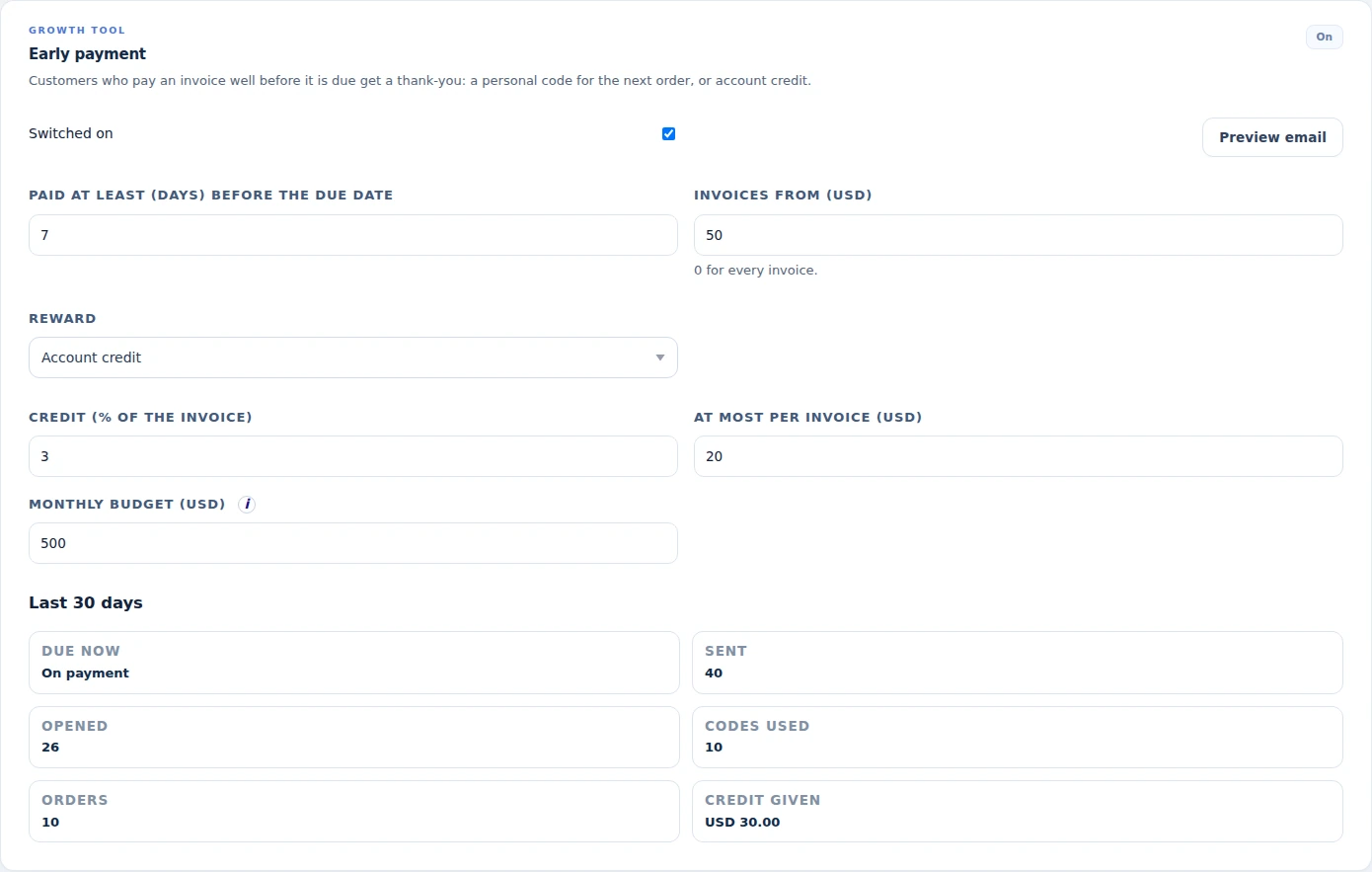 Reward customers who pay ahead of the due date
Make the renewal part of the offer
An offer can extend beyond the first invoice. Define eligible renewal-saving schedules for a set number of renewals or for an ongoing qualifying relationship, and show the customer the renewal context when they choose.
Retention tools can also present an eligible service with an offer to stay during the cancellation journey. When accepted, the module starts the configured saving schedule. Scheduled savings continue through their configured term, with handling for changes your team makes to the customer's recurring price. Your team can explain both the first saving and what continues on later invoices, helping the customer understand the ongoing offer.
- Qualifying service
- Renewal saving
- Customer choice
- Ongoing schedule
Help shoppers find the right plan
Let a shopper describe what they need and explore a small set of relevant products from your WHMCS catalogue. Offer Studio's assistant can bring the conversation, eligible offers and product cards together, with optional AI and configured taught answers behind the experience.
Signed-in customers can receive checked actions for their own domains, services and invoices. When the question needs staff, the handoff can lead to a support ticket, chat or contact page. The conversation can therefore lead to a relevant plan, an eligible offer, an account action or a person who can help, keeping the assistance connected to the products your business sells.
- Customer question
- Relevant catalog
- Eligible offer
- Cart or staff help
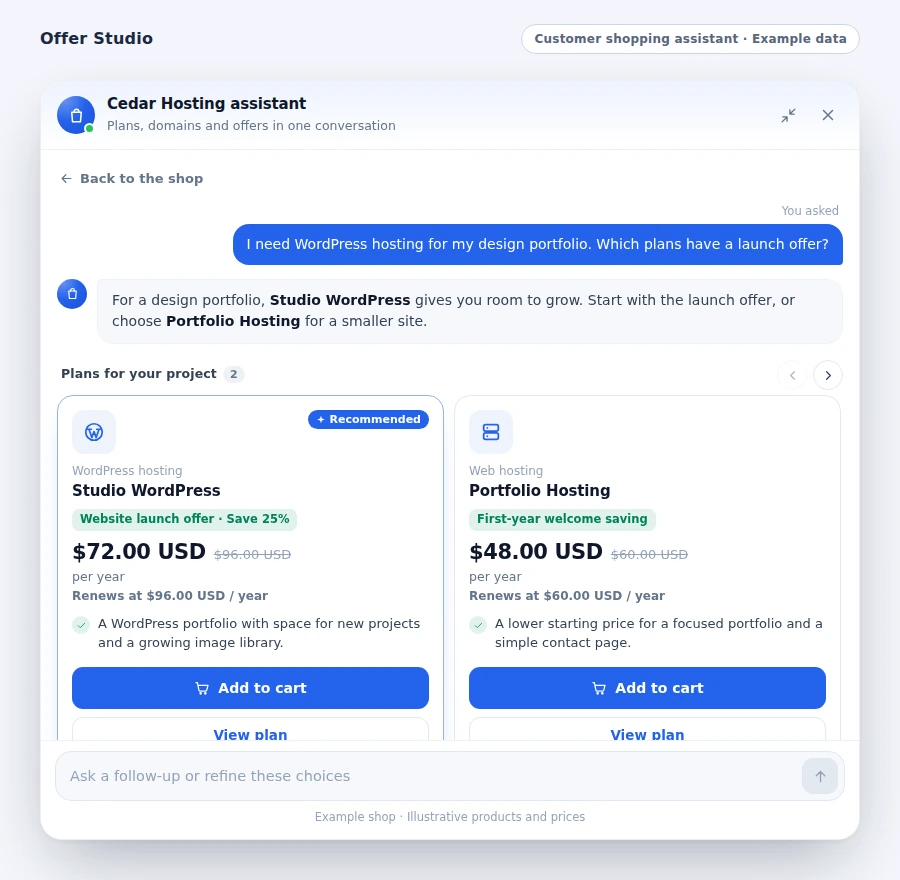
Learn from the campaign's results
Compare offers and inspect what followed the customer's choice. A/B experiments can split visitors between variants or a control, while smart offer ordering can prioritize eligible offers without changing their price or qualification rules.
Finance views add the savings, invoice states, costs and reconciliation context behind the campaign. Review the response together with order volume and cost coverage so the team can understand the campaign's commercial context. Recommendation and conversation reports add another view of how customers reached the offer. Marketing and finance can use the same recorded results to decide what to refine next.
- Offer variants
- Customer response
- Order and saving
- Refine the campaign
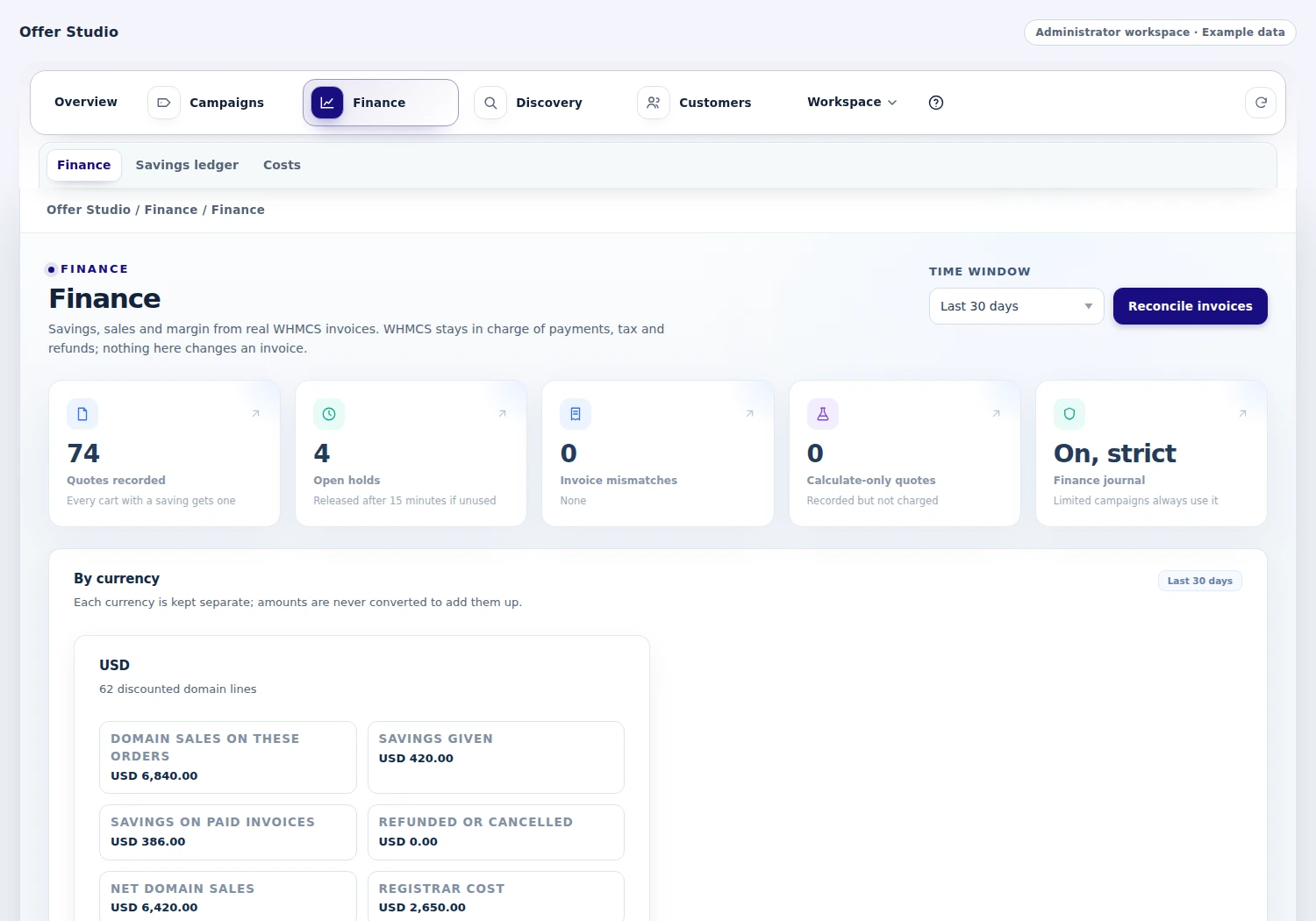
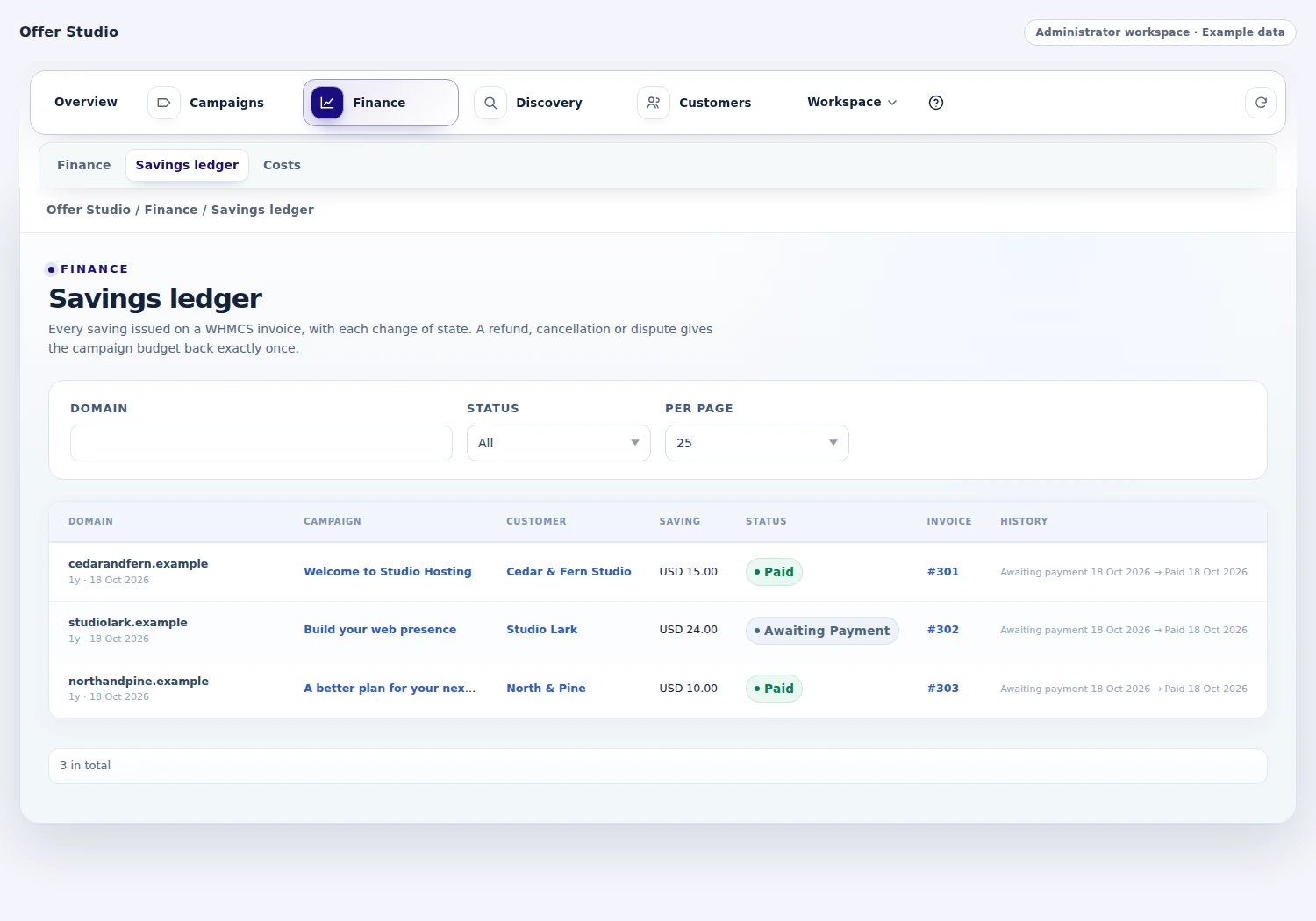 Trace a saving through its invoice history
Make the offer visible before the customer checks out
A well-designed campaign needs a place in the customer's journey. Offer Studio can show eligible promotions on store product cards with the relevant before-and-after price, bring selected offers into client-area sidebars, and display a site offer strip with a direct route to the plan, domain search, bundle or campaign. Choose the pages and presentation that fit the buying moment.
The offer strip can rotate through several qualifying offers, with customer controls for pausing or moving between them. Configured countdowns help explain offers that are ending soon. Approved external websites can also receive the configured assistant and supported offer experiences from your WHMCS installation, bringing visitors back to its cart. Campaign eligibility and final pricing continue through the normal offer and checkout rules.
- Product-card offer badges and applicable cycle prices
- Client-area sidebar cards with page targeting
- Offer strips with rotation, controls and ending times
- Configured external-site experiences with WHMCS cart handoff
Follow the saving through the invoice
Connect the promotion to the commercial result. Offer Studio records quoted savings, the related invoice lines and the payment states that follow, with currencies kept separate. Review discounts awaiting payment, savings on paid invoices, refunds and cancellations, then compare the result with your recorded domain, plan or addon costs where those costs are available.
Campaign budgets and usage follow the recorded invoice lifecycle, including supported refund adjustments. Reconciliation lets staff revisit recent invoices and their quotes, while cost coverage and budget views add context to the campaign's results. The finance workspace gives marketing and finance a shared record for deciding whether to continue an offer, change its terms or investigate a particular order.
- Quote-to-invoice savings records and state history
- Separate currency totals and recorded cost context
- Campaign usage with refund and cancellation adjustments
- Invoice reconciliation and campaign budget visibility
Teach the answers your customers keep asking for
Your team knows the details customers ask about before choosing hosting. Turn that knowledge into reusable assistant answers without writing code. Add several ways a customer might phrase a question, write the answer you want to provide and attach up to three relevant plans. Standing instructions add your preferred guidance to AI responses, while lessons can be enabled, edited or kept inactive for later.
Conversation and feedback views show unanswered or unhelpful questions so the team can teach the next useful answer. Preview a question's lesson match and review how often an answer is used. When AI is available, the matching lesson informs its response; when AI is unavailable or its budget is reached, the stored answer can still be shown with the relevant product cards.
- Question variations, written answers and linked plans
- Standing instructions and reusable enabled lessons
- Unanswered-question and customer-feedback review
- Lesson previews, usage counts and stored-answer fallback
A closer look at what’s included.
Explore the tools inside Offer Studio, grouped around the work they help you do.
Campaign design
- Domain registration, transfer and renewal offers
- Product, billing-cycle and addon campaigns
- Whole-order incentives and codes
- Reusable audience rules
- Draft, approval, scheduling and revisions
Price and eligibility
- Customer-scenario simulation
- Savings and renewal context
- Combining and qualification rules
- Cost/margin review where configured
- Calculate-only and test-account modes
Cart and bundle experience
- Hosting/domain/addon bundles
- Compatible selection and cart handoff
- Saved domain and cart choices
- Guest cart-link requests
- Configured client and guest recovery
Customer growth
- Loyalty points and eligible account credit
- Referral rewards and holding periods
- Early-payment incentives
- Win-back and next-purchase offers
- Renewal schedules and cancellation retention
Guidance and insight
- Optional AI shopping assistance
- Configured taught answers and product cards
- Checked signed-in account actions
- Staff handoff options
- A/B experiments, finance and conversation reports
From the first action
to a useful outcome.
Follow the tasks inside Offer Studio. See which tools come into play and what the finished workflow delivers.
Launch a targeted campaign
Give marketing and finance a shared understanding of the offer before customers receive it.
Explore the interface- Select the products, domains or order conditions
- Define the audience, saving and combining rules
- Simulate a customer scenario and review the price
- Approve and publish the campaign on its schedule
Create a hosting bundle
Make the customer’s complete setup easier to select and understand.
Explore the interface- Choose the hosting plan and eligible domain offer
- Add compatible extras and qualification rules
- Review the combined cart journey
- Publish the package and follow the resulting orders
Develop a renewal offer
Keep the ongoing price and the customer’s reason to stay part of the same offer.
Explore the interface- Select the qualifying service and saving schedule
- Define the relevant customer or retention context
- Present the offer and record the customer’s choice
- Follow the scheduled savings and commercial results
Begin with an offer you can explain.
Choose a practical campaign, define the audience and simulate the customer’s price. Then introduce the presentation, recovery and reward tools that fit the buying journey you want to create.
- Select the campaign targets and audience
- Set the saving, limits and approval policy
- Simulate the price and configure its presentation
- Publish and review customer and finance results
Try Offer Studio free for 7 days.
Explore the module with the workflows that matter to your business. Create a campaign, simulate a customer scenario and explore bundles, recovery and shopping assistance. Use the seven-day trial to get familiar with the experience, then continue with an annual licence when you are ready.
- Start your 7-day module trial
- Configure the features you want to explore
- Follow a practical customer or staff workflow
- Continue with the annual licence
See what’s new.
Explore new capabilities, improvements and fixes. Every published release includes its version, date and change details.
Keep up with Offer Studio.
Open the changelog to read published release notes and explore the product’s development over time.
Offer Studio Answer Studio
Good questions.
Better answers.
Explore what Offer Studio can do, how it fits your WHMCS, and the details that matter before you get started.
Tell us what you want to offer your customers. We can help you explore the capabilities and plan your next step.
Contact Nabtech ↗01What kinds of offers can I create?
Offer Studio supports campaigns for domain registration, transfer and renewal, hosting products, addons and whole orders. You can define audience rules, terms, codes, automatic qualification, savings and limits, then decide how the offer combines with other eligible promotions.
02Can I inspect an offer before publishing it?
Yes. The simulation lab lets you review a customer scenario, normal price, applicable saving and renewal context. Cost and margin views add the financial information you configure. Drafts, approval settings and test-account modes help the team introduce the campaign in stages.
03How do bundles work?
The bundle builder connects eligible hosting plans, domains and compatible extras in the WHMCS cart. Campaign rules determine which selections qualify and what saving applies. Customers can assemble the items they need while your team maintains the pricing and conditions behind the package.
04Can shoppers return to an unfinished cart?
Saved-domain and saved-cart experiences retain useful choices, and guests can request a cart link by email. You can configure follow-up steps for eligible unfinished client carts and guest reminders. When the customer returns, the current catalog and offer rules determine the available purchase.
05What rewards and retention tools are included?
The suite includes loyalty points, referral rewards, early-payment incentives, win-back tools and relevant next-purchase offers. Renewal-saving schedules and cancellation retention offers let you develop the ongoing relationship. Qualification, reward timing and history are managed through the corresponding workspaces.
06What can the shopping assistant help with?
The assistant works from your WHMCS catalog, eligible offers and configured answers, with optional AI behind the conversation. It can present relevant product cards and checked account actions for signed-in customers. A staff handoff can lead to the support route you configure when a person should continue.
07Can I try the module before buying?
Yes. Start the seven-day free trial of Offer Studio and explore the features through a workflow relevant to your business. The trial page explains the terms and starting steps. The annual licence is available when you decide to continue.
08Where can I see product updates?
The current version is shown on this page, and the Changelog opens the release notes. Each published release explains its new capabilities, improvements and fixes. You can read the notes in the page or open the full release history when you want to follow the product over time.
09Can I reuse an audience across several campaigns?
Yes. Reusable audience rules let your team carry the same customer qualification into more than one campaign. Each offer can still have its own products, terms, saving and limits. This helps you develop a series of relevant promotions for an audience while keeping the commercial terms of each campaign clear.
10How do I control what happens when more than one offer applies?
Set the campaign's qualification and combining rules, then use the simulation lab to inspect a customer scenario. The review shows the applicable saving and the conditions behind rejected offers. Your team can check how overlapping promotions behave before publishing, with the intended price and renewal context in view.
11Where can customers see an offer before they reach checkout?
Offer Studio can place eligible promotions on store product cards, selected client-area sidebars and a site offer strip. Product cards can show the applicable cycle price, while the strip can rotate qualifying offers with customer controls and configured ending times. Each placement gives the shopper a route to the relevant plan, domain search, bundle or campaign.
12Can an external marketing website introduce my WHMCS offers?
Approved external websites can use the configured shopping assistant and supported offer experiences from your WHMCS installation. Visitors can discover a relevant product or promotion there, then continue to your WHMCS cart. Your configured campaign eligibility and checkout pricing still determine the offer that applies to the purchase.
13Can I follow a campaign's saving after the invoice is created?
Yes. Campaign finance connects quoted savings with the related invoice lines and payment states. Review unpaid and paid savings, refunds and cancellations, with currency totals kept separate. Recorded supplier costs add commercial context where available, and reconciliation and budget views help the team follow the offer through its invoice lifecycle.
14Can I compare two offers before deciding which one to keep?
A/B experiments can split visitors between offer variants or a control. Review customer response alongside order volume, savings and the available cost information to understand the result. Smart offer ordering can also prioritize eligible offers while keeping their existing price and qualification rules, giving the team evidence for its next campaign decision.
15Can a renewal discount last for a chosen number of renewals?
Yes. Eligible renewal savings can run for a specified number of renewals or continue for an ongoing qualifying relationship. Define the service and saving schedule, then present the renewal context with the offer. This lets your team explain the initial saving and what the customer can expect on later qualifying invoices.
16Can I give an eligible customer an offer to stay during cancellation?
Retention tools can present a stay offer during an eligible service's cancellation journey. When the customer accepts, Offer Studio starts the configured saving schedule. Your team controls the qualifying service and offer terms, giving the customer a concrete reason to reconsider with the ongoing price benefit explained.
17When does a customer receive a referral reward?
Referral rewards follow your configured qualification checks and holding period after the referred friend's order. Customers and staff can follow the referral's progress through the reward views and administrator history. This lets your business recognize a successful referral at the stage you have chosen for the reward.
18Can I reward customers for paying an invoice early?
Yes. Early-payment incentives can reward customers who settle qualifying invoices ahead of time. Choose the conditions and reward that fit the payment behavior you want to encourage, then review progress and history in the corresponding reward workspace. It gives your team another way to recognize a valuable customer action.
19Can our team teach the shopping assistant answers without code?
Yes. Create a lesson with several ways a customer might ask the question, write your answer and attach up to three relevant plans. Add standing instructions for AI guidance, preview lesson matches and review unanswered questions or feedback. Your team can improve recurring buying conversations from the assistant's teaching workspace.
20Can a taught answer still help when AI is unavailable?
A matching enabled lesson can supply its stored answer and relevant product cards when AI is unavailable or its configured budget has been reached. When AI is available, the lesson can inform the response. This gives your team a reusable source of product guidance alongside the optional AI conversation.
No questions match that search. Try a different word or explore all topics.
See the difference.Try it in your WHMCS.
Give Offer Studio a place in your WHMCS. Start a seven-day free trial and explore the capabilities that matter to your business before buying.