Run the business behind your WHMCS.
Bring pricing, billing, domain operations, service management and support into one working environment. Find the records that need attention, review the next action and follow the result with the customer context close at hand.
Look closer. See what you can do.
Look inside the product, explore its capabilities and see how the work comes together.
Start the day with an operational brief
Review ranked priorities, financial exposure, background work and the health signals that need the team’s attention.
Explore this capabilityA working environment for the whole operating day.
Start with the work that needs attention, then move into the tools that can resolve it. Toolkit connects commercial review, customer context and day-to-day service operations so staff can understand the scope of a decision before taking action.
Pricing and margin
Collect supported registrar costs, apply Profit Guard rules and prepare reviewed price changes.
Billing review
Investigate invoice exceptions with payment, credit, recurring-price and client context.
Domains and services
Follow domain synchronization, transfers, provisioning and eligible lifecycle work.
Customer support
Work with support queues, account identification, access details and service notices.
Client 360
Bring services, domains, invoices, tickets, notes, tasks and issues into one client view.
Automation and insight
Build workflows, follow background jobs and use reporting views to organize the next step.
Start with the work that needs attention.
Bring operational issues into a working inbox your team can manage. Toolkit groups recurring problems, records their history and lets staff assign an owner, add context, snooze a follow-up or resolve the issue after reviewing it.
The daily overview connects that attention list to recent activity, approvals and running work. Open the affected record, check its current state and choose the appropriate next step. Verification and eligible retry actions help move an issue toward a result, while notes and ownership make it easier for another team member to continue the work.
- Daily attention and activity views
- Failure Inbox with owners and notes
- Snooze, verify, resolve and reopen
- Relevant record and retry paths
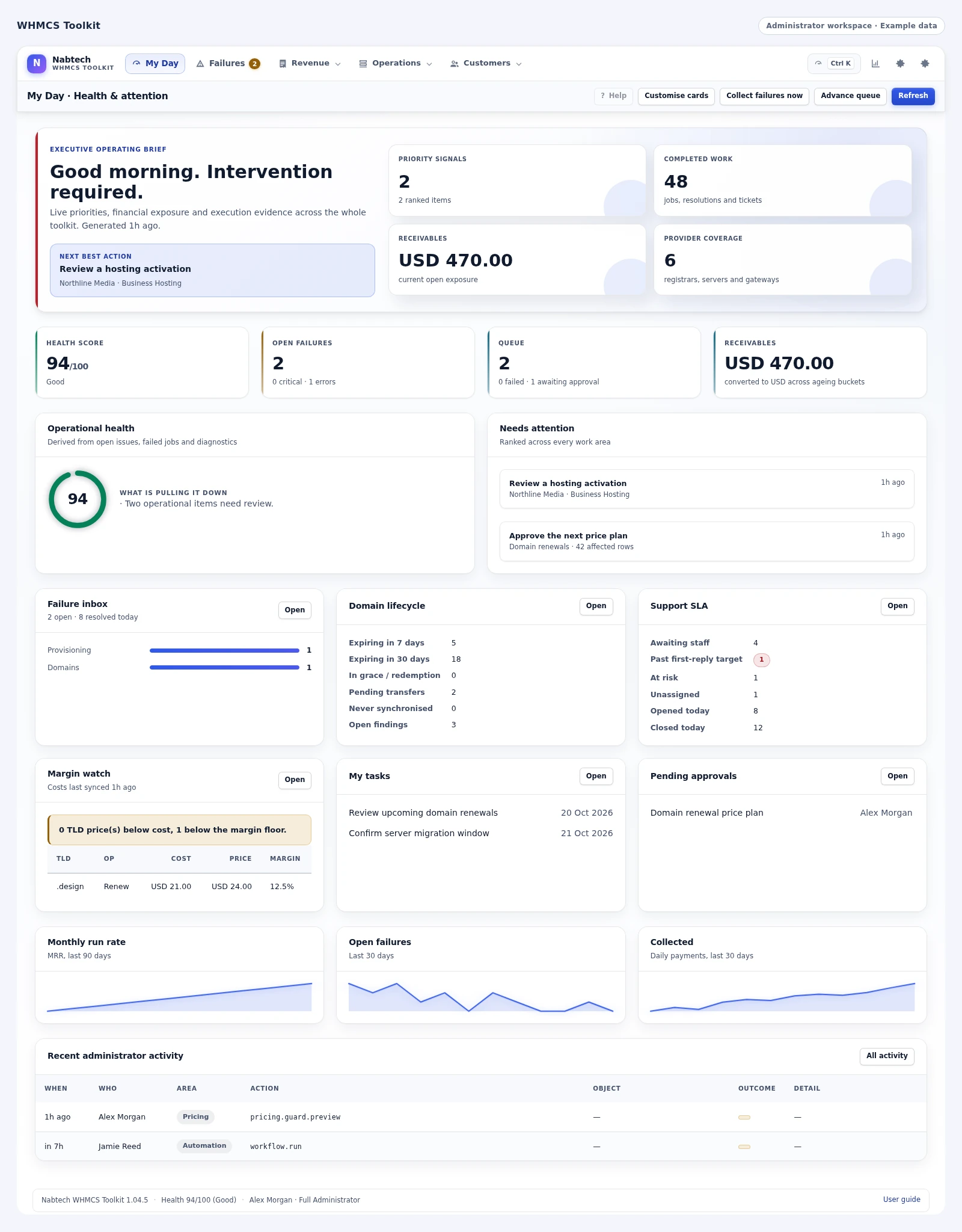
 Follow the work in the queue
Protect margin when supplier costs move
A new registrar price should lead to a considered pricing decision. Toolkit brings supported registrar cost feeds, markup rules and margin checks into the same workflow. Your team can review missing terms, unusual changes and prices that need attention before preparing a catalogue update.
Build a price plan, inspect the affected records and choose when the change should take effect. Where your approval policy requires another administrator, the plan waits for that review. The result is a clearer path from supplier costs to the prices your business publishes.
- Registrar costs
- Profit rules
- Price-plan preview
- Published prices
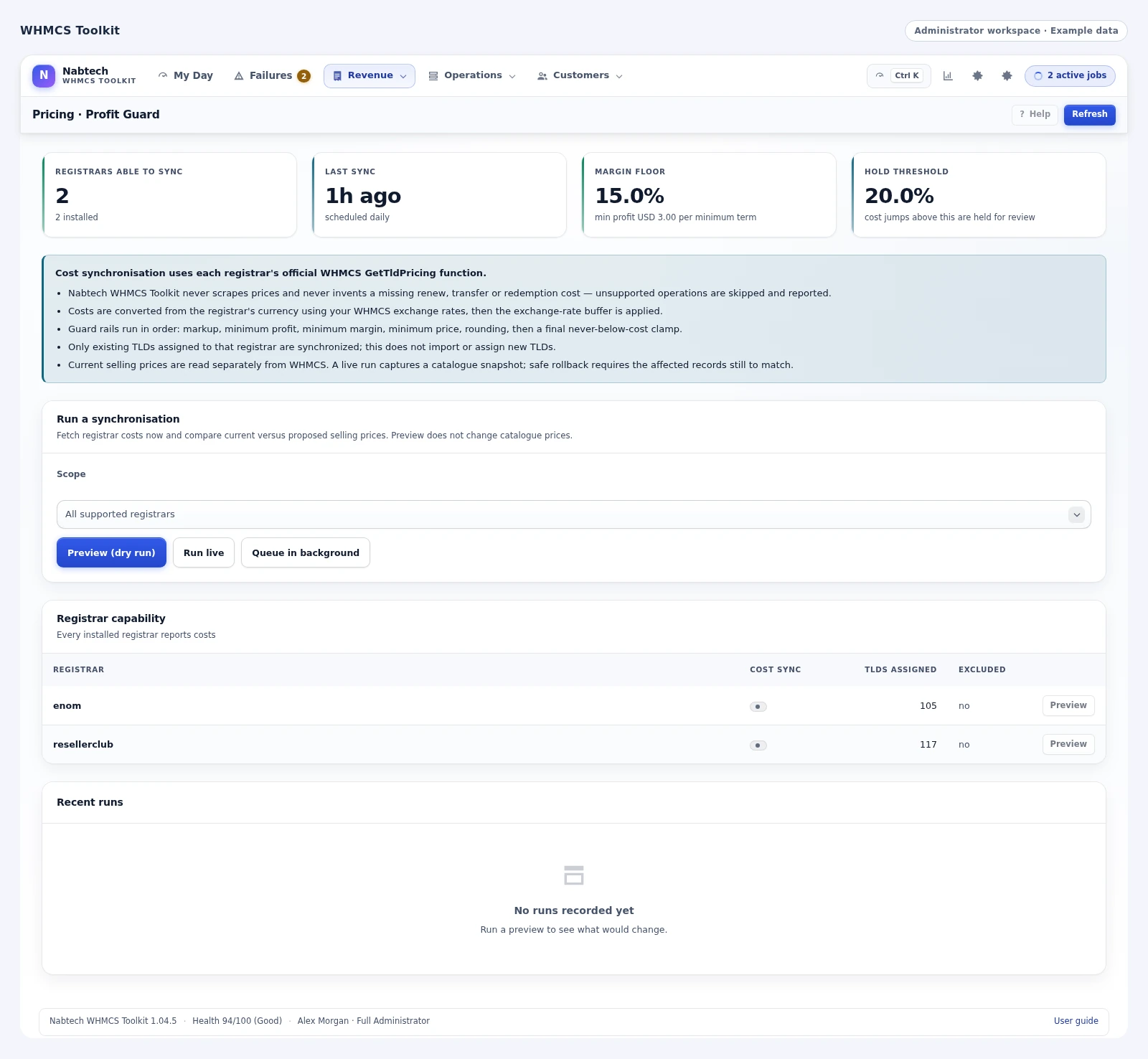
 Review the registrar’s cost snapshots
Put invoice exceptions in front of the right person
An unpaid invoice, an outdated recurring price and a duplicate order call for different decisions. Toolkit gives finance staff dedicated views for those situations, together with the client, payment and credit context needed to investigate them.
From the review workspace, authorized staff can preview supported invoice actions and queue eligible records. Each record keeps an individual outcome for follow-up, so the team can see which work completed and what still needs attention. This gives finance a practical working sequence from an invoice question to a reviewed action and its result.
- Invoice exceptions
- Payment and credit
- Reviewed actions
- Individual outcomes
Give support the context to help
A ticket makes more sense when the team can see the customer behind it. Toolkit combines support workload and SLA views with client context, follow-up tasks and tools for collecting the information a support case requires.
Support PIN workflows help staff identify the relevant account. Configured access forms let customers provide service details separately from ordinary ticket text, with consent, logged staff access and retention controls. Department signatures and service notices help keep replies consistent. These features connect queue management with the information staff need when they open the next ticket.
- Workload and SLA
- Support PIN
- Ticket access details
- Service notices
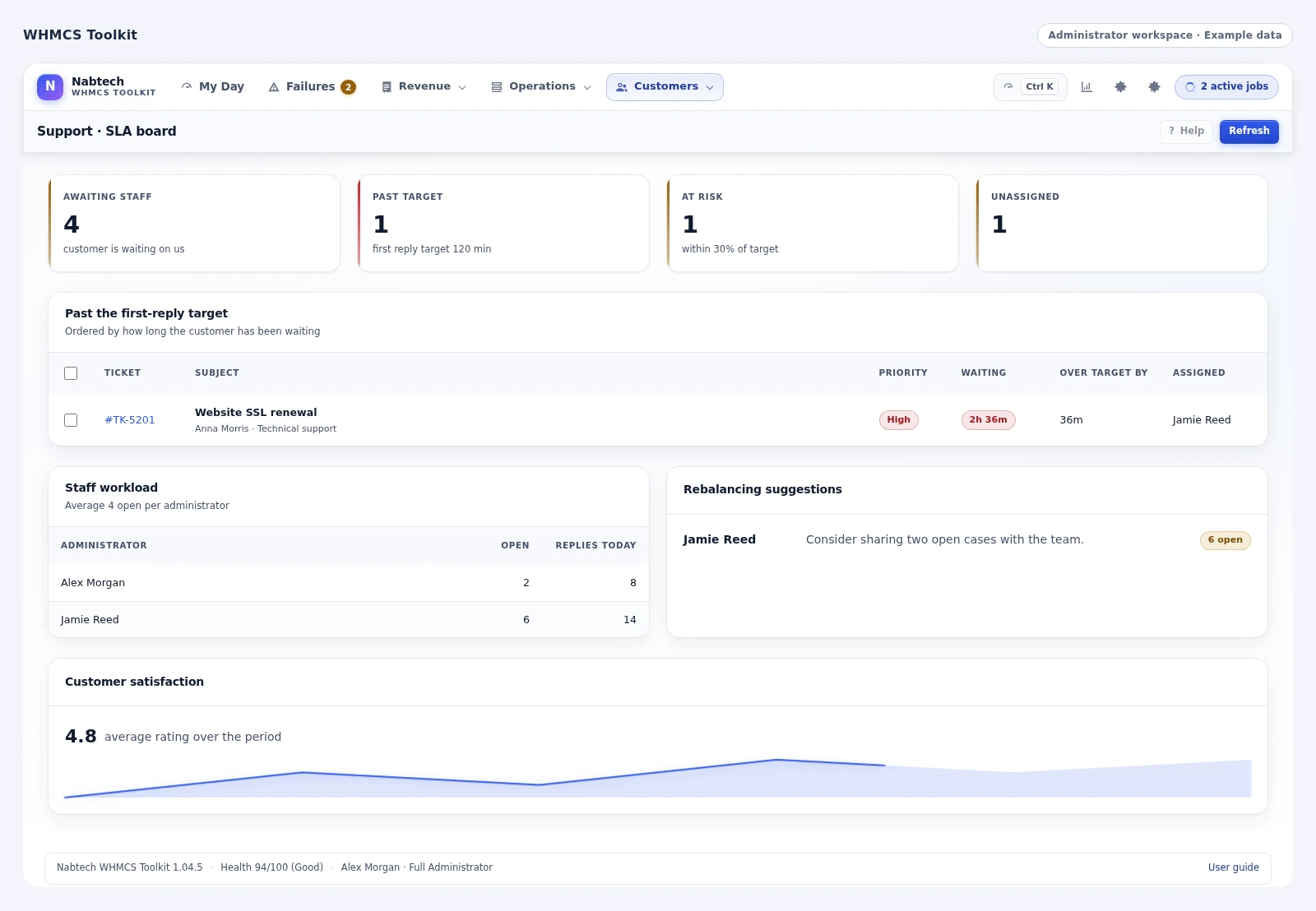
 Find the support cases that need work
Keep domains and services moving
Find domains that need synchronization, transfers that need review and hosting services with failed provisioning work. Toolkit puts those operational views beside the actions your installed registrar and server modules support.
Staff can inspect the record, review an eligible bulk operation and follow its result in the job queue. Internal domain moves, managed archives and current-state checks address the work that otherwise sits between standard WHMCS screens. The same workspace brings together the customer record, provider action and follow-up history, giving operations staff a clearer way to manage the services and domains the business sells.
- Domain sync
- Transfer review
- Provisioning work
- Bulk outcomes
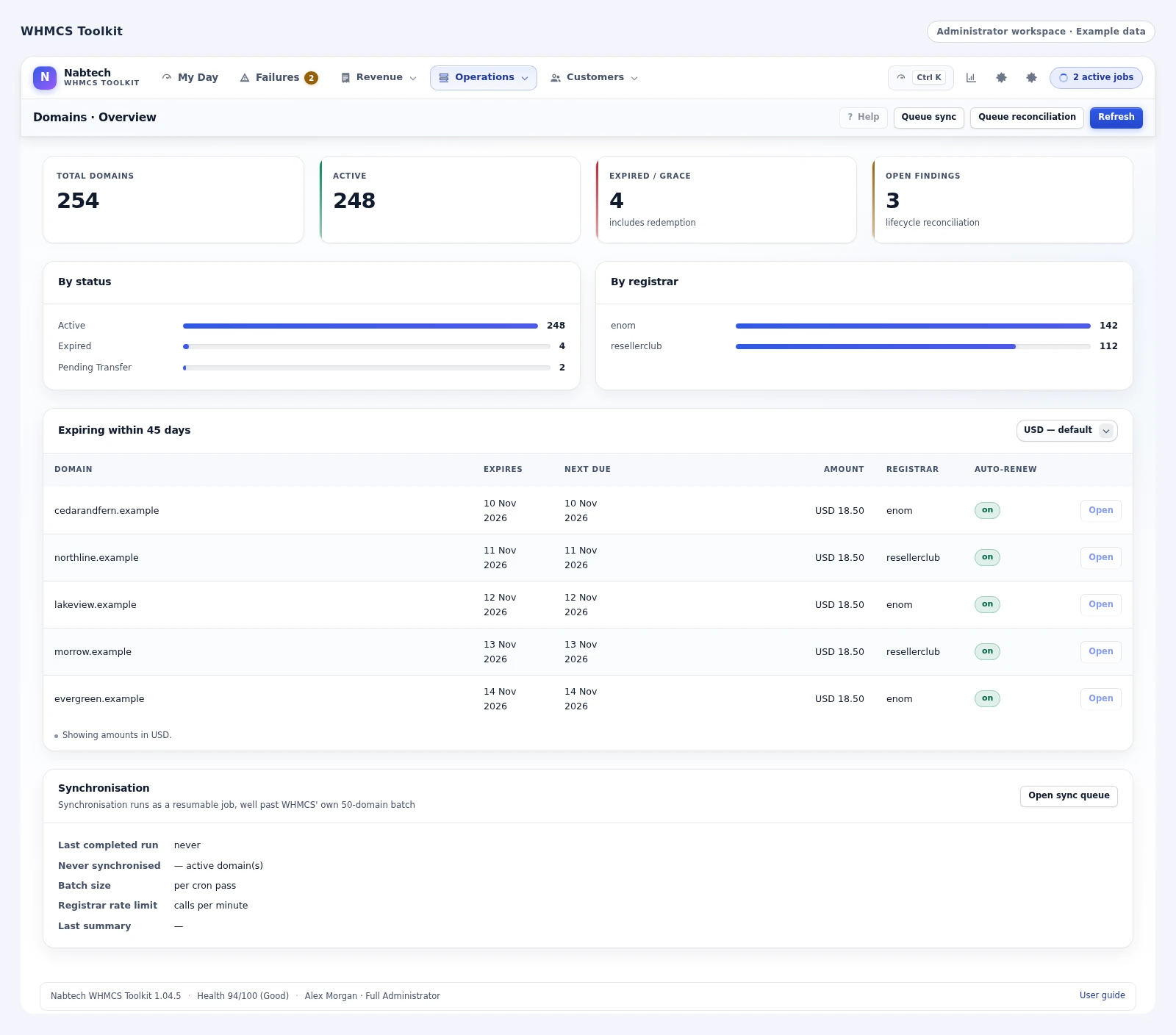
 Review domain lifecycle findings
Turn repeatable checks into workflows
Use Workflow Studio to describe the records you want to watch, the conditions that matter and the follow-up your team needs. A workflow can create a staff task, open an issue, apply a client tag, send a WHMCS email template or queue supported checks.
Start with a template or create a rule, preview its matches and keep a version history as the process evolves. Manual runs, schedules and supported WHMCS events cover different operating rhythms. Teams can standardize repeatable work while keeping higher-impact lifecycle decisions in the appropriate reviewed workspace.
- Conditions
- Preview matches
- Actions and schedules
- Run history
See the whole client relationship
Client 360 brings a customer's services, domains, invoices, payments, tickets, notes, tasks and issues into one profile. It gives support and operations a shared starting point when a question crosses department boundaries.
A finance review can lead to a service issue; a support case can explain a cancellation risk; a domain problem can sit beside an unpaid renewal. Toolkit makes those relationships easier to inspect. Tags and saved reporting views then help the team organize follow-up across more than one customer, while keeping the original WHMCS records available.
- Services and domains
- Invoices and payments
- Tickets and notes
- Tasks and issues
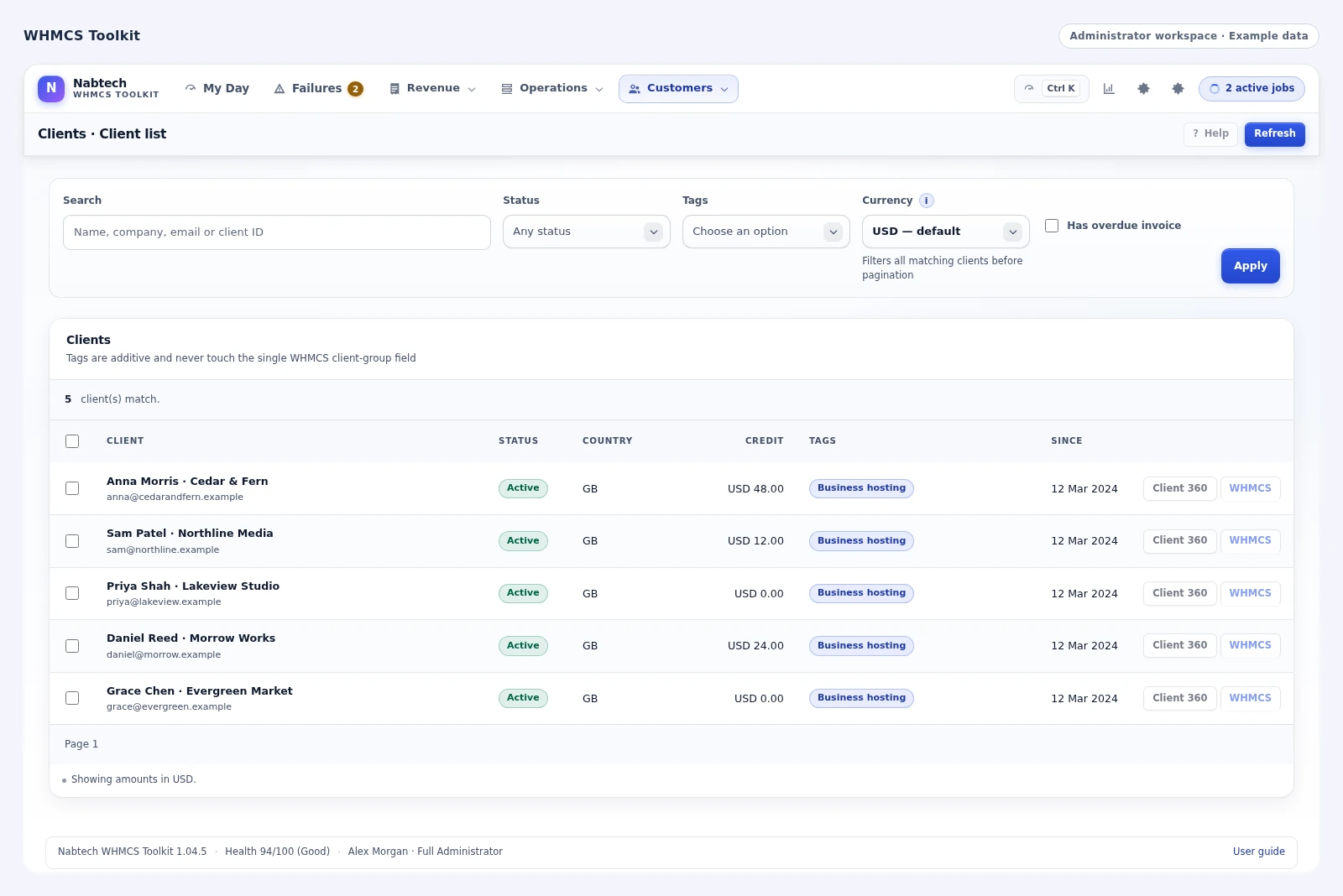
 Organise customers with tags and segments
Preview, approve and follow the result
Operational work needs a visible sequence. Toolkit provides previews, permissions, approval policies and background jobs so staff can understand the selected scope before supported changes run.
After execution, the queue and activity history show what happened to individual records. Supported price plans also retain snapshots for a reviewed rollback. An approver can follow the plan from its proposed scope to its effective date and recorded results, while the team has a clear place to investigate unfinished items. This turns a large operational change into a visible sequence people can manage together.
- Selected scope
- Preview and approval
- Scheduled execution
- Results and rollback
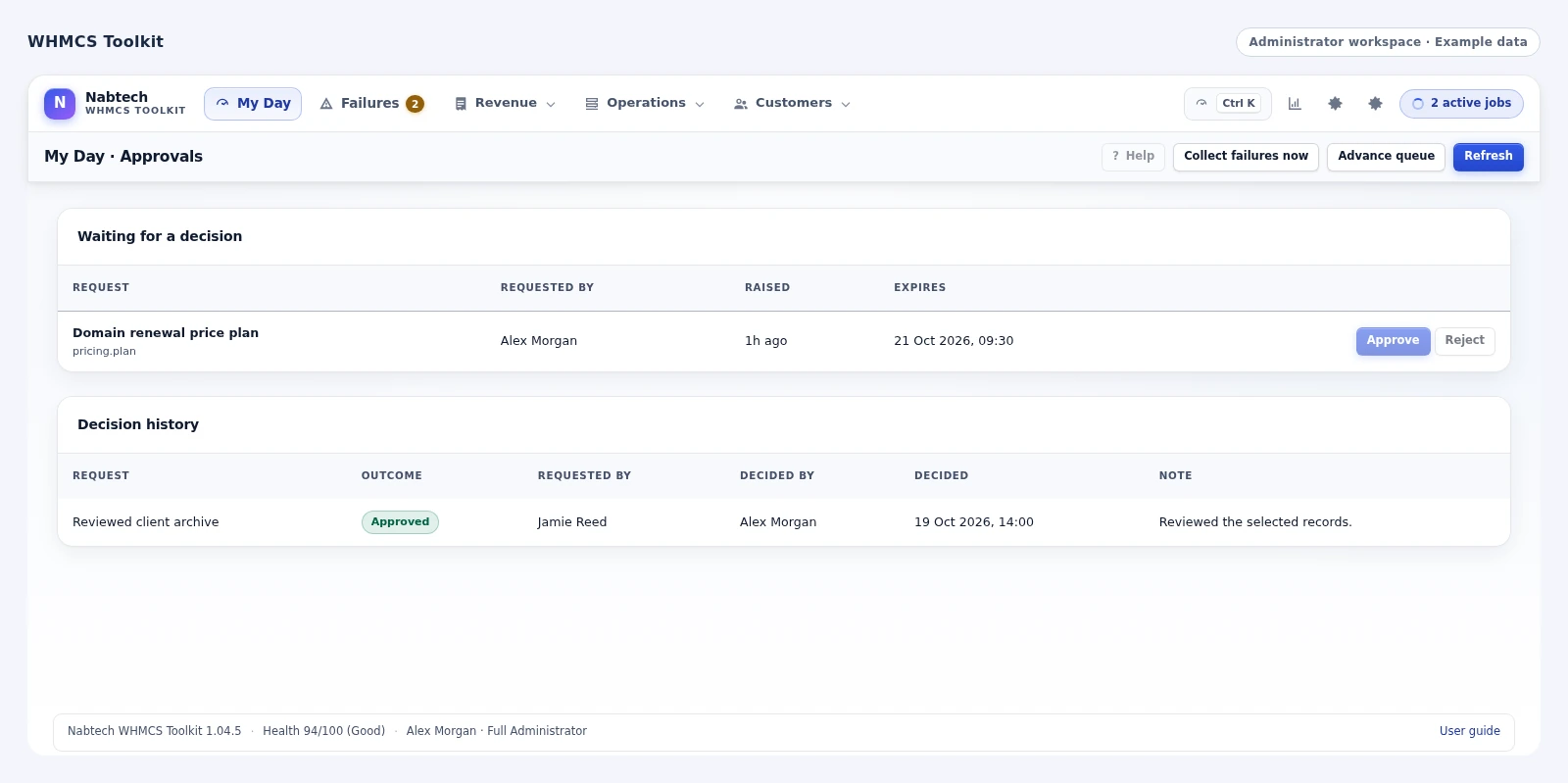
 Prepare a bulk price change
Understand the business behind the daily workload
Turn the activity in WHMCS into a clearer view of your hosting business. Compare revenue by product, customer, server, registrar or domain extension, then review recurring run rate, cancellations, overdue payments and expenses in a selected reporting currency. The reporting workspace brings those questions together so your team can investigate the figures that matter to the business.
Domain renewal forecasts show upcoming expiry months, renewal value and estimated costs where recorded supplier costs are available. Save the report definitions you use regularly and schedule daily, weekly or monthly delivery to administrators through WHMCS. Daily metric snapshots add a longer view of active clients, services, domains, collections and open work, helping the team follow changes over time.
- Revenue by product, client, server, registrar and TLD
- Recurring run rate, churn and expense reporting
- Domain renewal forecasts with known cost context
- Saved reports, scheduled delivery and daily trends
Keep customers informed while your team works
A service interruption or planned maintenance window creates an immediate communication job. Toolkit gives your team a place to publish the first customer update, describe the affected services, set the status and keep adding progress as the work moves forward. Client-area banners carry the message where customers already manage their accounts, with scheduled windows for planned work and timed notices for announcements.
Enable the incident reply option to give newly opened support tickets the latest service update while they remain in the queue for a person. Optional synchronization keeps the corresponding WHMCS Network Issues entry aligned with the incident history. From the first notice to the resolved update, your team can maintain one clear account of what is happening.
- Incident updates and planned maintenance windows
- Customer banners and timed announcements
- Optional ticket replies using the latest update
- Optional WHMCS Network Issues synchronization
Plan the next account with capacity in view
Bring account capacity into everyday provisioning decisions. Toolkit compares active and suspended WHMCS service counts with each server's configured account limit, highlights high and full allocation levels, and presents ranked assignment guidance. Your team can see which configured destinations have room before deciding where another account should go.
Provider readiness adds the supported create, suspend, terminate and package-change operations alongside recorded outcomes and maintenance status. Maintenance flags are considered in assignment guidance and supported action preparation, while service checks surface records that need attention in WHMCS. The result is a practical planning view for staff: configured capacity, usable module operations and outstanding service work in one place.
- WHMCS account counts against configured server limits
- High-capacity indicators and ranked assignment advice
- Provider maintenance and supported-operation visibility
- Service-record checks alongside provisioning work
A closer look at what’s included.
Explore the tools inside WHMCS Toolkit, grouped around the work they help you do.
Attention and navigation
- Daily health and attention views
- Failure Inbox assignment and notes
- Verification and eligible retries
- Global search and command palette
- Recent activity and approval visibility
Pricing and finance
- Registrar cost collection
- Markup, margin and minimum-price rules
- Rounding and below-cost controls
- Price-plan preview and scheduling
- Invoice exception and credit context
Domains and services
- Domain synchronization and transfer review
- Internal domain moves
- Provisioning and service-state review
- Eligible bulk operations
- Managed archives and operation history
Support and clients
- Support workload and SLA views
- Support PIN workflows
- Configured ticket-access forms
- Department signatures and incident notices
- Client 360, tags and follow-up tasks
Automation and reports
- Workflow templates and custom rules
- Client tags, staff tasks and issue actions
- WHMCS email-template actions
- Manual, scheduled and event-based runs
- Saved reporting views and job outcomes
From the first action
to a useful outcome.
Follow the tasks inside WHMCS Toolkit. See which tools come into play and what the finished workflow delivers.
Respond to a registrar price change
Turn a supplier update into a deliberate pricing decision with a clear record of the work.
Explore the interface- Collect the selected registrar costs
- Review the proposed markup and margin results
- Preview the affected catalogue records and approve the plan
- Schedule the change and follow individual results
Investigate an invoice exception
Give finance a practical route from a billing question to an informed follow-up.
Explore the interface- Open the billing review workspace
- Inspect the client, invoice, payment and credit context
- Preview an eligible action for the selected records
- Follow each result and assign any remaining work
Standardize a recurring check
Make repeatable operating work easier for the team to maintain.
Explore the interface- Choose a Workflow Studio template or create a rule
- Set the conditions and preview matching records
- Choose the task, issue, tag or notification action
- Run on the appropriate schedule and inspect history
Start with one operating workflow.
Set the workspace around the responsibilities of your team. Connect the relevant registrar data, review permissions and approval rules, and introduce the tools through a concrete task such as a pricing review or invoice investigation.
- Set staff access and approval responsibilities
- Select the commercial and operational tools to use
- Preview a focused set of records
- Follow the job, history and reporting views
Try WHMCS Toolkit free for 7 days.
Explore the module with the workflows that matter to your business. Review a price plan, inspect an invoice exception and explore a client through Client 360. Use the seven-day trial to get familiar with the experience, then continue with an annual licence when you are ready.
- Start your 7-day module trial
- Configure the features you want to explore
- Follow a practical customer or staff workflow
- Continue with the annual licence
See what’s new.
Explore new capabilities, improvements and fixes. Every published release includes its version, date and change details.
Keep up with WHMCS Toolkit.
Open the changelog to read published release notes and explore the product’s development over time.
WHMCS Toolkit Answer Studio
Good questions.
Better answers.
Explore what WHMCS Toolkit can do, how it fits your WHMCS, and the details that matter before you get started.
Tell us what you want to offer your customers. We can help you explore the capabilities and plan your next step.
Contact Nabtech ↗01Who is WHMCS Toolkit designed for?
Toolkit is designed for owners, operations teams, finance staff, domain administrators and support leads who manage a WHMCS business. It brings the records and operating tools involved in that work into dedicated workspaces, including pricing, invoices, domains, services, support and customer context.
02What does Profit Guard help me control?
Profit Guard turns supported registrar cost information into proposed selling prices using the markup, minimum profit, margin, rounding and minimum-price rules you choose. Staff can inspect the proposal and its affected records before preparing a price plan for review or scheduled application.
03Can staff preview changes before they run?
Yes. Supported price and operational workflows provide a preview of the selected scope. Your approval policy determines when another administrator reviews a plan. Background jobs and activity history then show the result for each record, with reviewed rollback available for supported price plans.
04What is included in Client 360?
Client 360 brings the customer’s services, domains, invoices, payments, tickets, notes, tasks and issues into one profile. Support and finance can use it when a question spans several records, while tags and reporting views help organize follow-up across a group of clients.
05How does it help a support team?
The support tools combine workload and SLA views with follow-up tasks, Support PIN workflows, configured access forms, department signatures and service notices. Staff can identify the relevant account, find the details needed for a case and retain context as the work moves through the queue.
06What can Workflow Studio automate?
A workflow can watch selected records and conditions, then create staff tasks or issues, apply client tags, send configured WHMCS email templates or queue supported checks. Start with a template, preview its matches and use manual runs, schedules or supported events to fit the way your team works.
07Can I try the module before buying?
Yes. Start the seven-day free trial of WHMCS Toolkit and explore the features through a workflow relevant to your business. The trial page explains the terms and starting steps. The annual licence is available when you decide to continue.
08Where can I see product updates?
The current version is shown on this page, and the Changelog opens the release notes. Each published release explains its new capabilities, improvements and fixes. You can read the notes in the page or open the full release history when you want to follow the product over time.
09How does the Failure Inbox help staff hand work to one another?
The Failure Inbox gives an operational issue an owner, notes and a visible history. Staff can inspect the affected record, snooze a follow-up, verify its state, resolve it or reopen it when more work is needed. Eligible retry paths remain connected to the issue, so another team member can pick up the task with its context intact.
10Which billing questions can the finance workspace help investigate?
Toolkit provides views for invoice exceptions such as unpaid invoices, outdated recurring prices and duplicate orders, together with payment, credit and client context. Authorized staff can inspect the relevant records, preview a supported action and follow its individual outcome. This supports a reviewed finance workflow when similar-looking billing problems require different decisions.
11Can customers supply support access details through a dedicated form?
Yes. Configured ticket-access forms let customers provide the service details a support case needs separately from ordinary ticket text. The workflow includes consent, logged staff access and retention controls. Your team can collect the intended information in a structured way and keep its handling connected to the support case.
12Can I compare revenue across products, servers and domain suppliers?
Yes. The reporting workspace can organize revenue by product, customer, server, registrar or domain extension. It also brings recurring run rate, cancellations, overdue payments and expenses into the selected reporting currency. These views help the team investigate which parts of the hosting business contribute to the figures being reviewed.
13Can Toolkit help plan for upcoming domain renewals?
Domain renewal forecasts group upcoming expiries by month and show their renewal value. Where supplier costs have been recorded, the forecast can add estimated cost context. This gives staff a useful planning view of approaching renewal periods while keeping cost estimates tied to the information available in the installation.
14Can our regular management reports be saved and scheduled?
Yes. Save the report definitions your team uses and schedule daily, weekly or monthly delivery to administrators through WHMCS. Daily metric snapshots also provide a longer view of active clients, services, domains, collections and open work. Teams can return to a consistent reporting setup while following how the underlying business changes over time.
15How can we keep customers informed during an incident or maintenance window?
Staff can publish incident updates, describe affected services and schedule planned maintenance or timed announcements. Client-area banners carry the information into the customer's account. Optional incident replies can give newly opened tickets the latest update while they remain in the support queue, and optional WHMCS Network Issues synchronization keeps the corresponding status entry aligned.
16What does the server-capacity view measure?
Toolkit compares active and suspended WHMCS service counts with each server's configured account limit. It highlights high or full allocation levels and provides ranked assignment guidance. This gives provisioning staff an account-capacity view to consult when choosing a destination for the next service, alongside the server's maintenance and supported-operation information.
17Can staff review provider readiness before preparing service work?
Yes. Provider readiness shows supported create, suspend, terminate and package-change operations, together with recorded outcomes and maintenance status. Maintenance flags are considered in assignment guidance and supported action preparation. The available operations follow the installed server modules, helping staff plan a service action with the relevant provider context in view.
18How does Toolkit help with domain synchronization and transfer follow-up?
Dedicated domain views help staff find records that need synchronization or a transfer review. Staff can inspect the domain, use the actions supported by the installed registrar module and follow eligible bulk work in the job queue. Internal domain moves, managed archives and operation history also cover the administrative work around a domain's lifecycle.
19Can staff identify unusual supplier prices before updating the catalogue?
Yes. The pricing workflow brings supported registrar cost information together with reviews for missing terms, unusual changes and prices needing attention. Profit Guard applies your commercial rules to the available costs. Staff can then inspect the proposed catalogue impact and prepare a reviewed price plan with an appropriate effective time.
20What happens when some records in a bulk job still need attention?
Background jobs retain individual record outcomes, so the team can see completed work and inspect the items that still need follow-up. Staff can use the affected record, activity history and issue context to decide the next step, including an eligible retry where supported. This keeps a large job understandable at the level of each customer, invoice, domain or service involved.
No questions match that search. Try a different word or explore all topics.
See the difference.Try it in your WHMCS.
Give WHMCS Toolkit a place in your WHMCS. Start a seven-day free trial and explore the capabilities that matter to your business before buying.